# Description des prestations Tâches & CRM

# Tâches

# Tâches

<table id="bkmrk-titel-verf%C3%BCgbar-widg" style="border-collapse:collapse;width:100%;height:143.391px;"><colgroup><col style="width:12.6341%;"></col><col style="width:30.9829%;"></col><col style="width:56.383%;"></col></colgroup> <thead> <tr style="height:29.7969px;"> <td style="height:29.7969px;">Titre</td> <td style="height:29.7969px;">Widget</td> <td style="height:29.7969px;">Description du widget</td> </tr> </thead> <tbody> <tr style="height:113.594px;"> <td style="height:113.594px;">Tâches</td> <td style="height:113.594px;"><div drawio-diagram="1876">[![Y6JwL9W92DjOoxSL-drawing-9-1750931210.png](https://fr.wiki.dedesales.de/uploads/images/gallery/2026-09/lZ0WsaH6WW7mnd66-y6jwl9w92djooxsl-drawing-9-1750931210.png)](https://wiki.dedesales.de/uploads/images/gallery/2025-06/jiIOQTAkn7m5jiYc-image.png)</div>

 </td> <td style="height:113.594px;">

1. Nombre de tâches
2. Coin droit dans la couleur de la priorité la plus élevée. 
    - Prio Z : rouge foncé
    - Prio A : rouge
    - Prio B : orange
    - Prio C : sans
 

Disponible dans

- Tableau de bord de la page d'accueil
- Fiche client
 
 </td> </tr> <tr> <td>  
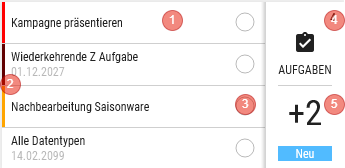
</td> <td><div drawio-diagram="1885"><img src="https://fr.wiki.dedesales.de/uploads/images/gallery/2026-09/XQ6jGQtr1eTCwxfV-gkwygt8opr3fz9to-drawing-9-1751265677.png" alt="gkwygt8oPr3fz9TO-drawing-9-1751265677.png"/></div>

 </td> <td>

1. Affiche les 4 premières tâches, triées par Nom 
    - Si disponible, la date de fin est affichée
    - Clic dans le tableau de bord de la page d'accueil : ouvre "Clients d'une tâche"
    - Clic dans le tableau de bord client : ouvre la tâche pour le client.
2. Barre verticale à gauche 
    - Prio Z : rouge foncé
    - Prio A : rouge
    - Prio B : orange
    - Prio C : sans
3. Le statut de modification est symbolisé par le cercle. 
    - Dans le tableau de bord client  
        
        - Vide : Non modifié
        - À moitié : En cours de traitement
    -  Dans le tableau de bord de la page d'accueil  
        
        - Le cercle est rempli en pourcentage, selon le nombre de clients pour lesquels la tâche est déjà réalisée.
4. Nombre de tâches 
    - Le clic affiche l'aperçu des tâches
5. Nombre de nouvelles tâches depuis la dernière transmission
    
    Le clic ouvre la page d'aperçu, mais affiche uniquement les nouvelles tâches depuis la dernière transmission
 

Disponible dans

- Tableau de bord de la page d'accueil
- Fiche client
 
 </td> </tr> </tbody> </table>

### Clients d'une tâche

Titre :  "Nom de la tâche"

Liste tous les clients pour lesquels cette tâche est encore encours

#### Grille

<table id="bkmrk-click-swipe-ansichte" style="border-collapse:collapse;width:100%;height:101px;"><colgroup><col style="width:33.3731%;"></col><col style="width:33.3731%;"></col><col style="width:33.3731%;"></col></colgroup> <thead> <tr> <td>Clic</td> <td>Glisser</td> <td>Vues</td> </tr> </thead> <tbody> <tr> <td>Ouvre la tâche pour le client</td> <td>

1. Ouvre le client
 
 </td> <td>

1. Tableaux
 
 </td> </tr> </tbody> </table>

##### Définition des colonnes

<table id="bkmrk-bezeichnung-sichtbar" style="border-collapse:collapse;width:100%;height:297.969px;"><colgroup><col style="width:28.7247%;"></col><col style="width:14.6603%;"></col><col style="width:11.4401%;"></col><col style="width:7.86864%;"></col><col style="width:37.4255%;"></col></colgroup> <thead> <tr style="height:29.7969px;"> <td style="height:29.7969px;">Désignation</td> <td style="height:29.7969px;">Visible</td> <td style="height:29.7969px;">Tri</td> <td style="height:29.7969px;">Texte complet</td> <td style="height:29.7969px;">Explication</td> </tr> </thead> <tbody> <tr style="height:29.7969px;"> <td style="height:29.7969px;">Code couleur</td> <td style="height:29.7969px;">ForceVisible</td> <td style="height:29.7969px;">  
</td> <td style="height:29.7969px;">  
</td> <td style="height:29.7969px;">En cours de traitement : orange  
</td> </tr> <tr style="height:29.7969px;"> <td style="height:29.7969px;">Colonnes clients</td> <td style="height:29.7969px;">comme chez Clients  
</td> <td style="height:29.7969px;">ASC (Nom1)  
</td> <td style="height:29.7969px;">Comme chez Clients  
</td> <td style="height:29.7969px;">  
</td> </tr> <tr style="height:29.7969px;"> <td style="height:29.7969px;">Début</td> <td style="height:29.7969px;">VisibleOnlyLandscape</td> <td style="height:29.7969px;">  
</td> <td style="height:29.7969px;">  
</td> <td style="height:29.7969px;">JJ.MM.AAAA  
</td> </tr> <tr style="height:29.7969px;"> <td style="height:29.7969px;">Fin</td> <td style="height:29.7969px;">Visible</td> <td style="height:29.7969px;">  
</td> <td style="height:29.7969px;">  
</td> <td style="height:29.7969px;">JJ.MM.AAAA  
</td> </tr> </tbody> </table>

### Aperçu des tâches

Titre :  Tâches

#### Grille

<table id="bkmrk-click-swipe-ansichte-1" style="border-collapse:collapse;width:100%;height:101px;"><colgroup><col style="width:33.3731%;"></col><col style="width:33.3731%;"></col><col style="width:33.3731%;"></col></colgroup> <thead> <tr> <td>Clic</td> <td>Glisser</td> <td>Vues</td> </tr> </thead> <tbody> <tr> <td>Ouvre la tâche </td> <td> </td> <td>

1. Tableaux
 
 </td> </tr> </tbody> </table>

##### Définition des colonnes

<table id="bkmrk-bezeichnung-sichtbar-1" style="border-collapse:collapse;width:100%;height:432.344px;"><colgroup><col style="width:28.7247%;"></col><col style="width:14.6603%;"></col><col style="width:11.4401%;"></col><col style="width:7.86864%;"></col><col style="width:37.4255%;"></col></colgroup> <thead> <tr style="height:29.7969px;"> <td style="height:29.7969px;">Désignation</td> <td style="height:29.7969px;">Visible</td> <td style="height:29.7969px;">Tri</td> <td style="height:29.7969px;">Texte complet</td> <td style="height:29.7969px;">Explication</td> </tr> </thead> <tbody> <tr style="height:80.1875px;"> <td style="height:80.1875px;">Code couleur</td> <td style="height:80.1875px;">ForceVisible</td> <td style="height:80.1875px;">ASC</td> <td style="height:80.1875px;">  
</td> <td style="height:80.1875px;">Prio Z : rouge foncé  
Prio A : rouge  
Prio B : orange  
Prio C : sans  
</td> </tr> <tr style="height:46.5938px;"> <td style="height:46.5938px;">Tâche</td> <td style="height:46.5938px;">Visible</td> <td style="height:46.5938px;">  
</td> <td style="height:46.5938px;">Oui  
</td> <td style="height:46.5938px;">  
</td> </tr> <tr style="height:46.5938px;"> <td style="height:46.5938px;">Début</td> <td style="height:46.5938px;">VisibleOnlyLandscape</td> <td style="height:46.5938px;">  
</td> <td style="height:46.5938px;">  
</td> <td style="height:46.5938px;">JJ.MM.AAAA  
</td> </tr> <tr style="height:29.7969px;"> <td style="height:29.7969px;">Fin</td> <td style="height:29.7969px;">Visible</td> <td style="height:29.7969px;">  
</td> <td style="height:29.7969px;">  
</td> <td style="height:29.7969px;">JJ.MM.AAAA  
</td> </tr> <tr style="height:29.7969px;"> <td style="height:29.7969px;">Encours</td> <td style="height:29.7969px;">Visible</td> <td style="height:29.7969px;">  
</td> <td style="height:29.7969px;">  
</td> <td style="height:29.7969px;">

- affiche le nombre d'entrées encore encours
- Uniquement via le tableau de bord de la page d'accueil
 
 </td> </tr> <tr style="height:46.5938px;"> <td style="height:46.5938px;">Réalisé</td> <td style="height:46.5938px;">VisibleOnlyLandscape</td> <td style="height:46.5938px;">  
</td> <td style="height:46.5938px;">  
</td> <td style="height:46.5938px;">

- affiche le nombre d'entrées réalisées
- Uniquement via le tableau de bord de la page d'accueil
 
 </td> </tr> <tr style="height:46.5938px;"> <td style="height:46.5938px;">Total</td> <td style="height:46.5938px;">VisibleOnlyLandscape</td> <td style="height:46.5938px;">  
</td> <td style="height:46.5938px;">  
</td> <td style="height:46.5938px;">

- affiche le nombre total d'entrées (encours + réalisé)
- Uniquement via le tableau de bord de la page d'accueil
 
 </td> </tr> <tr style="height:46.5938px;"> <td style="height:46.5938px;">Statut</td> <td style="height:46.5938px;">VisibleOnlyLandscape</td> <td style="height:46.5938px;">  
</td> <td style="height:46.5938px;">  
</td> <td style="height:46.5938px;">

- Non modifié
- En cours de traitement
- uniquement via le tableau de bord client
 
 </td> </tr> <tr style="height:29.7969px;"> <td style="height:29.7969px;">Priorité</td> <td style="height:29.7969px;">Hidden</td> <td style="height:29.7969px;">  
</td> <td style="height:29.7969px;">  
</td> </tr> </tbody> </table>

#### Tâche

Titre : "Nom de la tâche"  
Formulaire de la tâche

##### Bouton en bas 

Enregistrer - Enregistre la tâche

Clore - Clôt la tâche, elle ne peut plus être modifiée

<details id="bkmrk-faq-wie-steuere-ich-"> <summary>FAQ</summary>

 </details><details id="bkmrk-release-ab-version-1"> <summary>Release</summary>

</details>

# CRM

# CRM

<table id="bkmrk-titel-verf%C3%BCgbar-widg" style="border-collapse:collapse;width:100%;height:143.391px;"><colgroup><col style="width:26.2217%;"></col><col style="width:12.0532%;"></col><col style="width:61.8443%;"></col></colgroup> <thead> <tr style="height:29.7969px;"> <td style="height:29.7969px;">Titre</td> <td style="height:29.7969px;">Widget</td> <td style="height:29.7969px;">Description du widget</td> </tr> </thead> <tbody> <tr style="height:113.594px;"> <td style="height:113.594px;">&lt;Nom de la requête&gt;</td> <td style="height:113.594px;">[![image.png](https://fr.wiki.dedesales.de/uploads/images/gallery/2026-09/XOyu5vrbzS7Fq9qk-r5o7v6jbgi7y59ro-image.png)](https://wiki.dedesales.de/uploads/images/gallery/2025-06/R5O7v6jbGi7Y59ro-image.png)

 </td> <td style="height:113.594px;">Pour chaque formulaire CRM, il existe un widget dans le domaine correspondant pour lequel il est valide. Par exemple Interlocuteur, Client, Opportunité, etc.

 </td> </tr> </tbody> </table>

### En-tête

<div drawio-diagram="1874"><img src="https://fr.wiki.dedesales.de/uploads/images/gallery/2026-09/IM3iTVF7q98zL8nt-ufyuiynwa6f01oen-drawing-9-1750930833.png" alt="uFYuIYNwa6f01oen-drawing-9-1750930833.png"/></div>

1. Retour sans Enregistrer
2. Titre : "Nom de la requête"
 

#### Formulaire de la requête

Bouton en bas : Enregistrer

-  Clôture la Tâche.


<details id="bkmrk-faq-wie-steuere-ich-"> <summary>FAQ</summary>

 </details><details id="bkmrk-release-ab-version-1"> <summary>Release</summary>

</details>