# Proposition de commande

<table id="bkmrk-titel-verf%C3%BCgbar-widg" style="border-collapse:collapse;width:100%;height:143.391px;"><colgroup><col style="width:26.2217%;"></col><col style="width:12.0532%;"></col><col style="width:61.8443%;"></col></colgroup> <thead> <tr style="height:29.7969px;"> <td style="height:29.7969px;">Titre</td> <td style="height:29.7969px;">Widget</td> <td style="height:29.7969px;">Description du widget</td> </tr> </thead> <tbody> <tr style="height:113.594px;"> <td style="height:113.594px;">Proposition de commande</td> <td style="height:113.594px;">[![image.png](https://fr.wiki.dedesales.de/uploads/images/gallery/2026-09/2o6eBhYKOe5shYwT-8qr9a7kpbvjxidst-nb6image.png)](https://wiki.dedesales.de/uploads/images/gallery/2025-02/8qR9a7KpbVJXidst-nB6image.png)

 </td> <td style="height:113.594px;">Disponible :

- Saisie de la commande
- Saisie des retours
- Saisie de l'offre
 
 </td> </tr> </tbody> </table>

### Généralités

#### Ligne de titre

<table id="bkmrk-icon-erl%C3%A4uterung-unt" style="border-collapse:collapse;width:100%;"><colgroup><col style="width:11.2501%;"></col><col style="width:88.8691%;"></col></colgroup> <thead> <tr> <td>Icône</td> <td>Explication</td> </tr> </thead> <tbody> <tr> <td>[![image.png](https://fr.wiki.dedesales.de/uploads/images/gallery/2026-09/HVl2HOdrQVu1urE7-ys5cjoapo1ogu7db-dzgimage.png)](https://wiki.dedesales.de/uploads/images/gallery/2025-02/ys5cJoApo1OGu7DB-dZGimage.png)

 </td> <td>Sur iOS/Android, la fonction de partage est appelée.

Sur UWP, la boîte de dialogue Enregistrer s'ouvre.

 </td> </tr> <tr> <td>[![image.png](https://fr.wiki.dedesales.de/uploads/images/gallery/2026-09/0dqDkmF8fY0N7InG-wbkwc59o70psvi0a-macimage.png)](https://wiki.dedesales.de/uploads/images/gallery/2025-02/wbKWC59o70PSVi0A-MaCimage.png)

 </td> <td>Change vers le masque de contact du client actif.</td> </tr> </tbody> </table>

### Volet : Destinataire de l'e-mail

La sélection multiple est possible.

##### Conditions

Les destinataires suivants sont affichés lorsqu'une adresse e-mail est renseignée :

1. Contacts du client actif.
2. Le propre collaborateur
3. Collaborateurs de type "Service sédentaire"
4. Collaborateurs de type "Logisticien"
5. Si une adresse e-mail est enregistrée pour le client actif, la grille contient une entrée supplémentaire "Depuis les Données de base (...)".
 

#### Grille

<table id="bkmrk-click-swipe-ansichte" style="border-collapse:collapse;width:100%;"><colgroup><col style="width:33.3731%;"></col><col style="width:33.3731%;"></col><col style="width:33.3731%;"></col></colgroup> <thead> <tr> <td>Clic</td> <td>Glissement</td> <td>Vues</td> </tr> </thead> <tbody> <tr> <td>Marque l'entrée comme destinataire de l'e-mail</td> <td> </td> <td>

1. Tableau
 
 </td> </tr> </tbody> </table>

##### Définition des colonnes

<table id="bkmrk-bezeichnung-sichtbar" style="border-collapse:collapse;width:100%;"><colgroup><col style="width:28.7247%;"></col><col style="width:14.6603%;"></col><col style="width:11.4401%;"></col><col style="width:7.86864%;"></col><col style="width:37.4255%;"></col></colgroup> <thead> <tr> <td>Désignation</td> <td>Visible</td> <td>Tri</td> <td>Texte complet</td> <td>Explication</td> </tr> </thead> <tbody> <tr> <td>Case à cocher</td> <td>Forcé</td> <td>  
</td> <td>  
</td> <td>  
</td> </tr> <tr> <td>Titre</td> <td>Paysage</td> <td>  
</td> <td>  
</td> <td>  
</td> </tr> <tr> <td>Nom de famille</td> <td>Toujours</td> <td>Croissant</td> <td>Oui</td> <td>  
</td> </tr> <tr> <td>Prénom</td> <td>Toujours</td> <td>  
</td> <td>Oui</td> <td>  
</td> </tr> <tr> <td>E-mail</td> <td>Toujours</td> <td>  
</td> <td>Oui</td> <td>  
</td> </tr> <tr> <td>Poste</td> <td>Masqué</td> <td>  
</td> <td>  
</td> <td>  
</td> </tr> <tr> <td>Service</td> <td>Masqué</td> <td>  
</td> <td>  
</td> <td> </td> </tr> </tbody> </table>

### Volet : Lettre d'accompagnement (uniquement e-mail)

Saisissez ici un texte pour la lettre d'accompagnement de l'e-mail.

Les textes saisis ici peuvent être interprétés comme du HTML, s'il s'agit de HTML valide.

<table id="bkmrk-" style="border-collapse:collapse;width:100%;"><colgroup><col style="width:99.881%;"></col></colgroup><tbody><tr><td><div drawio-diagram="2266"><img src="https://fr.wiki.dedesales.de/uploads/images/gallery/2026-09/Rx8lC6Ln5xjS07eD-rltlmdtspjhmduti-drawing-9-1773215367.png" alt="RltLMdTSpJHmdUti-drawing-9-1773215367.png"/></div>

</td></tr></tbody></table>

1. Via la table de codes backend "Proposition de commande Blocs de texte" il est possible de créer des blocs de texte prédéfinis, qui peuvent être appelés via le menu kebab dans le panneau. Les blocs de texte définis peuvent contenir des formats HTML tels que des hyperliens.
 

#### À partir de la version 21 :

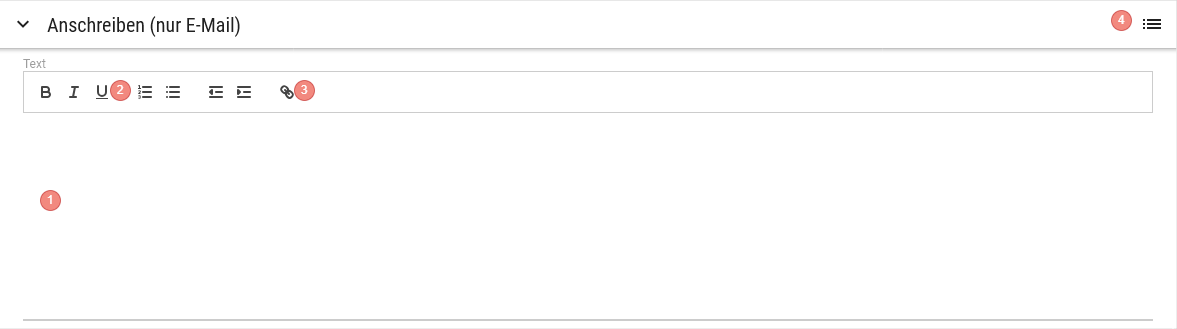
<div drawio-diagram="2383"><img src="https://fr.wiki.dedesales.de/uploads/images/gallery/2026-09/61HO8TQfUZTmGRlM-5yxuef2d9veb5wvr-drawing-9-1790582330.png" alt="5yxUEf2d9vEB5wvr-drawing-9-1790582330.png"/></div>

1. Saisie de texte avec une barre de formatage (éditeur WYSIWYG)
2. Gras, Italique, Souligné, liste numérotée, liste à puces, diminuer/augmenter le retrait
3. Symbole pour insérer des hyperliens
4. Proposition de commande Blocs de texte, comme auparavant
 

Depuis la version 21, une barre de formatage (éditeur WYSIWYG) est disponible au-dessus de la saisie de texte. Le texte n'a donc plus besoin d'être saisi manuellement en HTML.

#### Grille Blocs de texte de la proposition de commande

<table id="bkmrk-click-swipe-ansichte-1" style="border-collapse:collapse;width:100%;"><colgroup><col style="width:33.3731%;"></col><col style="width:33.3731%;"></col><col style="width:33.3731%;"></col></colgroup> <thead> <tr> <td>Clic</td> <td>Glissement</td> <td>Vues</td> </tr> </thead> <tbody> <tr> <td>Marque le bloc de texte comme lettre d'accompagnement de l'e-mail</td> <td> </td> <td>

1. Tableau
 
 </td> </tr> </tbody> </table>

##### Définition des colonnes

<table id="bkmrk-bezeichnung-sichtbar-1" style="border-collapse:collapse;width:100%;"><colgroup><col style="width:28.7247%;"></col><col style="width:14.6603%;"></col><col style="width:11.4401%;"></col><col style="width:7.86864%;"></col><col style="width:37.4255%;"></col></colgroup> <thead> <tr> <td>Désignation</td> <td>Visible</td> <td>Tri</td> <td>Texte complet</td> <td>Explication</td> </tr> </thead> <tbody> <tr> <td>Catégorie</td> <td>Forcé</td> <td>  
</td> <td>  
</td> <td>  
</td> </tr> <tr> <td>Clé</td> <td>Paysage</td> <td>  
</td> <td>  
</td> <td>  
</td> </tr> <tr> <td>Langue</td> <td>Toujours</td> <td>Croissant</td> <td>  
</td> <td>  
</td> </tr> <tr> <td>Mandant</td> <td>Toujours</td> <td>  
</td> <td>  
</td> <td>  
</td> </tr> <tr> <td>Valeur</td> <td>Toujours</td> <td>  
</td> <td>Oui</td> <td>  
</td> </tr> </tbody> </table>

### Panneau : Pièces jointes

Depuis la version 21, un panneau supplémentaire est disponible sous la lettre d'accompagnement, permettant de sélectionner des documents comme pièces jointes d'e-mail.

#### Grille

<table id="bkmrk-click-swipe-ansichte-2" style="border-collapse:collapse;width:100%;"><colgroup><col style="width:33.3731%;"></col><col style="width:33.3731%;"></col><col style="width:33.3731%;"></col></colgroup> <thead> <tr> <td>Clic</td> <td>Glissement</td> <td>Vues</td> </tr> </thead> <tbody> <tr> <td>Ajoute le document à la sélection comme pièce jointe d'e-mail</td> <td> </td> <td>

1. Tableaux
 
 </td> </tr> </tbody> </table>

##### Définition des colonnes

<table id="bkmrk-bezeichnung-sichtbar-2" style="border-collapse:collapse;width:100%;"><colgroup><col style="width:28.7247%;"></col><col style="width:14.6603%;"></col><col style="width:11.4401%;"></col><col style="width:7.86864%;"></col><col style="width:37.4255%;"></col></colgroup> <thead> <tr> <td>Désignation</td> <td>Visible</td> <td>Tri</td> <td>Texte complet</td> <td>Explication</td> </tr> </thead> <tbody> <tr> <td>Case à cocher</td> <td>Forcé</td> <td>  
</td> <td>  
</td> <td>Cochez la case pour ajouter la pièce jointe supplémentaire à l'e-mail.</td> </tr> <tr> <td>Type</td> <td>Toujours</td> <td>  
</td> <td>Oui</td> <td>"COMMANDE" : documents ajoutés en plus à la proposition de commande, peuvent être téléchargés ici.

"Collaborateur" : documents mis à disposition du collaborateur centralement via l'importation

 </td> </tr> <tr> <td>Chemin</td> <td>Toujours</td> <td>  
</td> <td>Oui</td> <td>  
</td> </tr> <tr> <td>Nom du fichier</td> <td>Toujours</td> <td>croissant</td> <td>Oui</td> <td>  
</td> </tr> </tbody> </table>

### Volet : Destinataire du fax

La sélection multiple est possible.

##### Conditions

Les destinataires suivants sont affichés lorsqu'un numéro de télécopie est renseigné :

1. Contacts du client actif.
2. Le propre collaborateur
3. Collaborateurs de type "Service sédentaire"
4. Collaborateurs de type "Logisticien"
5. Si un numéro de télécopie est enregistré pour le client actif, la grille contient une entrée supplémentaire "Depuis les Données de base (...)".
 

#### Grille

<table id="bkmrk-click-swipe-ansichte-3" style="border-collapse:collapse;width:100%;height:83.0313px;"><colgroup><col style="width:33.3731%;"></col><col style="width:33.3731%;"></col><col style="width:33.3731%;"></col></colgroup> <thead> <tr style="height:29.7969px;"> <td style="height:29.7969px;">Clic</td> <td style="height:29.7969px;">Glissement</td> <td style="height:29.7969px;">Vues</td> </tr> </thead> <tbody> <tr style="height:53.2344px;"> <td style="height:53.2344px;">Marque l'entrée comme destinataire du fax</td> <td style="height:53.2344px;"> </td> <td style="height:53.2344px;">

1. Tableau
 
 </td> </tr> </tbody> </table>

##### Définition des colonnes

<table id="bkmrk-bezeichnung-sichtbar-3" style="border-collapse:collapse;width:100%;height:238.375px;"><colgroup><col style="width:28.7247%;"></col><col style="width:14.6603%;"></col><col style="width:11.4401%;"></col><col style="width:7.86864%;"></col><col style="width:37.4255%;"></col></colgroup> <thead> <tr style="height:29.7969px;"> <td style="height:29.7969px;">Désignation</td> <td style="height:29.7969px;">Visible</td> <td style="height:29.7969px;">Tri</td> <td style="height:29.7969px;">Texte complet</td> <td style="height:29.7969px;">Explication</td> </tr> </thead> <tbody> <tr style="height:29.7969px;"> <td style="height:29.7969px;">Case à cocher</td> <td style="height:29.7969px;">Forcé</td> <td style="height:29.7969px;">  
</td> <td style="height:29.7969px;">  
</td> </tr> <tr style="height:29.7969px;"> <td style="height:29.7969px;">Titre</td> <td style="height:29.7969px;">Paysage</td> <td style="height:29.7969px;">  
</td> <td style="height:29.7969px;">  
</td> </tr> <tr style="height:29.7969px;"> <td style="height:29.7969px;">Nom de famille</td> <td style="height:29.7969px;">Toujours</td> <td style="height:29.7969px;">Croissant</td> <td style="height:29.7969px;">Oui</td> <td style="height:29.7969px;">  
</td> </tr> <tr style="height:29.7969px;"> <td style="height:29.7969px;">Prénom</td> <td style="height:29.7969px;">Toujours</td> <td style="height:29.7969px;">  
</td> <td style="height:29.7969px;">Oui</td> <td style="height:29.7969px;">  
</td> </tr> <tr style="height:29.7969px;"> <td style="height:29.7969px;">Télécopie</td> <td style="height:29.7969px;">Toujours</td> <td style="height:29.7969px;">  
</td> <td style="height:29.7969px;">Oui</td> <td style="height:29.7969px;">  
</td> </tr> <tr style="height:29.7969px;"> <td style="height:29.7969px;">Poste</td> <td style="height:29.7969px;">Masqué</td> <td style="height:29.7969px;">  
</td> <td style="height:29.7969px;">  
</td> </tr> <tr style="height:29.7969px;"> <td style="height:29.7969px;">Service</td> <td style="height:29.7969px;">Masqué</td> <td style="height:29.7969px;">  
</td> <td style="height:29.7969px;">  
</td> <td style="height:29.7969px;"> </td> </tr> </tbody> </table>

##### Boutons d'action

<table id="bkmrk-name-funktion-sichtb-1" style="width:99.7619%;height:59.5938px;"><colgroup><col style="width:9.319%;"></col><col style="width:64.2772%;"></col><col style="width:26.4038%;"></col></colgroup> <thead> <tr style="height:29.7969px;"> <td style="height:29.7969px;">Nom</td> <td style="height:29.7969px;">Fonction</td> <td style="height:29.7969px;">Visibilité</td> </tr> </thead> <tbody> <tr style="height:29.7969px;"> <td style="height:29.7969px;">Envoyer</td> <td style="height:29.7969px;">Envoie la proposition de commande aux adresses e-mail ou aux appareils de fax des destinataires sélectionnés.</td> <td style="height:29.7969px;">  
</td> </tr> </tbody> </table>

#####   


<details id="bkmrk-faq-wie-steuere-ich-"> <summary>FAQ</summary>

##### Où puis-je gérer les Blocs de texte pour "Lettre d'accompagnement uniquement (E-mail)" ?

Vous pouvez gérer les textes dans les Tableaux de codes dans le backend. Le domaine est "Proposition de commande Blocs de texte".

##### Pourquoi ne vois-je pas le domaine Destinataire Fax ?

Vous avez besoin d'une licence serveur fax correspondante pour que ce point soit visible.

 </details><details id="bkmrk-release-ab-version-1"> <summary>Version</summary>

##### À partir de la version 21

1. Éditeur WYSIWYG dans le panneau "Lettre d'accompagnement (uniquement e-mail)" incluant l'insertion d'hyperliens.
2. Nouveau panneau "Pièces jointes" pour la sélection de documents (type "COMMANDE" ou "Collaborateur") comme pièce jointe d'e-mail.
 
</details>