# Description de la prestation STATISTIQUE

# Description des prestations Documents

# Aperçu des documents

<table id="bkmrk-titel-verf%C3%BCgbar-widg" style="border-collapse:collapse;width:100%;height:143.391px;"><colgroup><col style="width:26.2217%;"></col><col style="width:12.0381%;"></col><col style="width:61.7402%;"></col></colgroup> <thead> <tr style="height:29.7969px;"> <td style="height:29.7969px;">Titre</td> <td style="height:29.7969px;">Widget</td> <td style="height:29.7969px;">Description du widget</td> </tr> </thead> <tbody> <tr style="height:113.594px;"> <td style="height:113.594px;">Documents</td> <td style="height:113.594px;"><div drawio-diagram="1964"><img src="https://fr.wiki.dedesales.de/uploads/images/gallery/2026-09/JE2UeTKWtiQDbG4k-tnfs25zzlc8bxarv-drawing-9-1754905835.png" alt="tnFs25zZLc8bxArv-drawing-9-1754905835.png"/></div>

 </td> <td style="height:113.594px;">1. Nombre de documents
 
Clic :

- Ouvre la page d’aperçu
 
Disponible :

- Fiche client
- Tableau de bord de la page d’accueil
 
 </td> </tr> </tbody> </table>

### Généralités

#### Menu kebab ([![image.png](https://fr.wiki.dedesales.de/uploads/images/gallery/2026-09/Zp3WWTLsIQQE7qkW-hpximage.png)](https://wiki.dedesales.de/uploads/images/gallery/2025-02/hpximage.png))


<table id="bkmrk-typ-men%C3%BCpunkt-erl%C3%A4ut" style="border-collapse:collapse;width:100%;height:328.766px;"><colgroup><col style="width:5.24434%;"></col><col style="width:31.2214%;"></col><col style="width:63.5343%;"></col></colgroup> <thead> <tr style="height:29.7969px;"> <td style="height:29.7969px;">Type</td> <td style="height:29.7969px;">Point de menu</td> <td style="height:29.7969px;">Explication</td> </tr> </thead> <tbody> <tr style="height:38.3906px;"> <td style="height:38.3906px;">[![Un seul élément actif est possible.](https://fr.wiki.dedesales.de/uploads/images/gallery/2026-09/VVilFrk0fhot186q-jbemwch2ontcwalv-r6pimage.png)](https://wiki.dedesales.de/uploads/images/gallery/2025-02/0VOf1XFA9ARgnmGd-OiLimage.png)

 </td> <td style="height:38.3906px;">Commandes</td> <td style="height:38.3906px;">Configuration de base \\ Rôles \\ &lt;Rôle&gt; \\ STATISTIQUE / Documents</td> </tr> <tr style="height:35.7969px;"> <td style="height:35.7969px;">![Un seul élément actif est possible.](https://fr.wiki.dedesales.de/uploads/images/gallery/2026-09/VVilFrk0fhot186q-jbemwch2ontcwalv-r6pimage.png)</td> <td style="height:35.7969px;">Bons de livraison</td> <td style="height:35.7969px;">Configuration de base \\ Rôles \\ &lt;Rôle&gt; \\ STATISTIQUE / Documents</td> </tr> <tr style="height:10px;"> <td style="height:10px;">![Un seul élément actif est possible.](https://fr.wiki.dedesales.de/uploads/images/gallery/2026-09/VVilFrk0fhot186q-jbemwch2ontcwalv-r6pimage.png)

 </td> <td style="height:10px;">Crédits</td> <td style="height:10px;">Configuration de base \\ Rôles \\ &lt;Rôle&gt; \\ STATISTIQUE / Documents</td> </tr> <tr style="height:35.7969px;"> <td style="height:35.7969px;">![Un seul élément actif est possible.](https://fr.wiki.dedesales.de/uploads/images/gallery/2026-09/VVilFrk0fhot186q-jbemwch2ontcwalv-r6pimage.png)</td> <td style="height:35.7969px;">Factures</td> <td style="height:35.7969px;">Configuration de base \\ Rôles \\ &lt;Rôle&gt; \\ STATISTIQUE / Documents</td> </tr> <tr style="height:35.7969px;"> <td style="height:35.7969px;">![Un seul élément actif est possible.](https://fr.wiki.dedesales.de/uploads/images/gallery/2026-09/VVilFrk0fhot186q-jbemwch2ontcwalv-r6pimage.png)

 </td> <td style="height:35.7969px;">Offres</td> <td style="height:35.7969px;">Configuration de base \\ Rôles \\ &lt;Rôle&gt; \\ STATISTIQUE / Documents</td> </tr> <tr style="height:35.7969px;"> <td style="height:35.7969px;">![Un seul élément actif est possible.](https://fr.wiki.dedesales.de/uploads/images/gallery/2026-09/jcyWueNsM1ng3Lm8-ghdv6yldau9qro3a-ti5image.png)

 </td> <td style="height:35.7969px;">Contrats</td> <td style="height:35.7969px;">Configuration de base \\ Rôles \\ &lt;Rôle&gt; \\ STATISTIQUE / Documents</td> </tr> <tr style="height:35.7969px;"> <td style="height:35.7969px;">![Un seul élément actif est possible.](https://fr.wiki.dedesales.de/uploads/images/gallery/2026-09/QV2PsgcvbgB8vI5u-onzmmy6khifxybqm-5awimage.png)

 </td> <td style="height:35.7969px;">Avis de prélèvement</td> <td style="height:35.7969px;">Configuration de base \\ Rôles \\ &lt;Rôle&gt; \\ STATISTIQUE / Documents</td> </tr> <tr style="height:35.7969px;"> <td style="height:35.7969px;">![Un seul élément actif est possible.](https://fr.wiki.dedesales.de/uploads/images/gallery/2026-09/VVilFrk0fhot186q-jbemwch2ontcwalv-r6pimage.png)

 </td> <td style="height:35.7969px;">Inventaires</td> <td style="height:35.7969px;">Configuration de base \\ Rôles \\ &lt;Rôle&gt; \\ STATISTIQUE / Documents</td> </tr> <tr style="height:35.7969px;"> <td style="height:35.7969px;">![Un seul élément actif est possible.](https://fr.wiki.dedesales.de/uploads/images/gallery/2026-09/VVilFrk0fhot186q-jbemwch2ontcwalv-r6pimage.png)

 </td> <td style="height:35.7969px;">Encours</td> <td style="height:35.7969px;">Configuration de base \\ Rôles \\ &lt;Rôle&gt; \\ STATISTIQUE</td> </tr> </tbody> </table>

#### Grille

<table id="bkmrk-click-swipe-ansichte" style="border-collapse:collapse;width:100%;"><colgroup><col style="width:33.3731%;"></col><col style="width:33.3731%;"></col><col style="width:33.3731%;"></col></colgroup> <thead> <tr> <td>Clic</td> <td>Glisser</td> <td>Vues</td> </tr> </thead> <tbody> <tr> <td>Ouvre le document</td> <td> </td> <td>1. Tableau
 
 </td> </tr> </tbody> </table>

##### Définition des colonnes

<table id="bkmrk-bezeichnung-sichtbar" style="border-collapse:collapse;width:100%;height:297.969px;"><colgroup><col style="width:28.7247%;"></col><col style="width:14.6603%;"></col><col style="width:11.4401%;"></col><col style="width:7.86864%;"></col><col style="width:37.4255%;"></col></colgroup> <thead> <tr style="height:29.7969px;"> <td style="height:29.7969px;">Désignation</td> <td style="height:29.7969px;">Visible</td> <td style="height:29.7969px;">Tri</td> <td style="height:29.7969px;">Texte complet</td> <td style="height:29.7969px;">Explication</td> </tr> </thead> <tbody> <tr style="height:29.7969px;"> <td style="height:29.7969px;">Code couleur</td> <td style="height:29.7969px;">  
</td> <td style="height:29.7969px;">  
</td> <td style="height:29.7969px;">Bleu : Prospect / Client transfert  
Rouge : Blocage livraison  
Non attribué : orange

Le bleu est avant "Non attribué" et avant Blocage livraison.  
C’est-à-dire qu’un prospect non attribué avec blocage livraison est affiché en bleu.  
Un client "Non attribué" avec blocage livraison est affiché en orange.

 </td> </tr> </tbody> </table>

##### Colonnes client

<table id="bkmrk-bezeichnung-sichtbar-1" style="border-collapse:collapse;width:100%;"><colgroup><col style="width:33.3731%;"></col><col style="width:14.6603%;"></col><col style="width:11.4401%;"></col><col style="width:7.86864%;"></col><col style="width:37.4255%;"></col></colgroup> <thead> <tr> <td>Désignation</td> <td>Visible</td> <td>Tri</td> <td>Texte intégral</td> <td>Explication</td> </tr> </thead> <tbody> <tr> <td>Code couleur</td> <td>Forcé</td> <td>  
</td> <td>  
</td> <td>Violet : Compte clé

Bleu : Prospect, client transféré, nouveau client

Rouge : Blocage livraison

Orange : Non attribué

Le violet a la valeur la plus élevée  
Le bleu est avant "Non attribué" et avant Blocage livraison.  
C'est-à-dire qu'un prospect non attribué avec blocage livraison est affiché en bleu.  
Un client "Non attribué" avec blocage livraison est affiché en orange.

 </td> </tr> <tr> <td>Nom 1</td> <td>Visible</td> <td>ASC</td> <td>Oui</td> <td>  
</td> </tr> <tr> <td>Nom 2</td> <td>Masqué</td> <td>  
</td> <td>Oui</td> <td>  
</td> </tr> <tr> <td>Nom 3</td> <td>Masqué</td> <td>  
</td> <td>Oui</td> <td>  
</td> </tr> <tr> <td>Client</td> <td>Paysage</td> <td>  
</td> <td>Oui</td> <td>  
</td> </tr> <tr> <td>Rue</td> <td>Paysage</td> <td>  
</td> <td>Oui</td> <td>  
</td> </tr> <tr> <td>Code postal</td> <td>Paysage</td> <td>  
</td> <td>Oui</td> <td>  
</td> </tr> <tr> <td>Ville</td> <td>Visible</td> <td>  
</td> <td>Oui</td> <td>  
</td> </tr> <tr> <td>Statut ABC</td> <td>Masqué</td> <td>  
</td> <td>  
</td> <td>  
</td> </tr> <tr> <td>Pays</td> <td>Masqué</td> <td>  
</td> <td>  
</td> <td>  
</td> </tr> <tr> <td>N° de téléphone</td> <td>Masqué</td> <td>  
</td> <td>  
</td> <td>  
</td> </tr> <tr> <td>Numéro de télécopie</td> <td>Masqué</td> <td>  
</td> <td>  
</td> <td>  
</td> </tr> <tr> <td>E-Mail</td> <td>Masqué</td> <td>  
</td> <td>Oui</td> <td>  
</td> </tr> <tr> <td>Service commercial</td> <td>Masqué</td> <td>  
</td> <td>  
</td> <td>  
</td> </tr> <tr> <td>Groupe de vendeurs</td> <td>Masqué</td> <td>  
</td> <td>  
</td> <td>  
</td> </tr> <tr> <td>Liste de prix</td> <td>Masqué</td> <td>  
</td> <td>  
</td> <td>  
</td> </tr> <tr> <td>Dernière visite</td> <td>Masqué</td> <td>  
</td> <td>  
</td> <td>Est déterminé automatiquement.</td> </tr> <tr> <td>Rythme des visites</td> <td>Masqué</td> <td>  
</td> <td>  
</td> <td>  
</td> </tr> <tr> <td>Échéance</td> <td>Masqué</td> <td>  
</td> <td>  
</td> <td>Le texte pour cette colonne est déterminé comme suit :  
pas de Remise de facture : pas de rythme des visites dans la fiche client  
aucune visite : pas de dernière visite disponible  
non échu : Dernière visite + rythme des visites &gt; semaine actuelle  
Maintenant : Dernière visite + rythme des visites == semaine actuelle  
En souffrance (1) : Dernière visite + rythme des visites &lt; semaine actuelle  
En souffrance (2) : Dernière visite + (rythme des visites \* 2) &lt;= semaine actuelle</td> </tr> <tr> <td>durée de la visite</td> <td>Masqué</td> <td>  
</td> <td>  
</td> <td>  
</td> </tr> <tr> <td>Tour</td> <td>Masqué</td> <td>  
</td> <td>  
</td> <td>  
</td> </tr> <tr> <td>Semaine de début</td> <td>Masqué</td> <td>  
</td> <td>  
</td> <td>  
</td> </tr> <tr> <td>Mandant</td> <td>Masqué</td> <td>  
</td> <td>  
</td> <td>  
</td> </tr> <tr> <td>Attribut1-16</td> <td>Masqué</td> <td>  
</td> <td>  
</td> <td>  
</td> </tr> <tr> <td>Type (client)</td> <td>Masqué</td> <td>  
</td> <td>  
</td> <td>  
</td> </tr> <tr> <td>Devise</td> <td>Masqué</td> <td>  
</td> <td>  
</td> <td>  
</td> </tr> <tr> <td>Zone</td> <td>Masqué</td> <td>  
</td> <td>  
</td> <td>  
</td> </tr> <tr> <td>Client depuis</td> <td>Masqué</td> <td>  
</td> <td>  
</td> <td>  
</td> </tr> <tr> <td>Département</td> <td>Masqué</td> <td>  
</td> <td>  
</td> <td>  
</td> </tr> <tr> <td>Interlocuteur principal</td> <td>Masqué</td> <td>  
</td> <td>  
</td> <td>  
</td> </tr> <tr> <td>Blocage livraison</td> <td>Masqué</td> <td>  
</td> <td>  
</td> <td>  
</td> </tr> <tr> <td>Incoterms</td> <td>Masqué</td> <td>  
</td> <td>  
</td> <td>  
</td> </tr> <tr> <td>Incoterms 2</td> <td>Masqué</td> <td>  
</td> <td>  
</td> <td>  
</td> </tr> <tr> <td>Conditions de paiement</td> <td>Masqué</td> <td>  
</td> <td>  
</td> <td>  
</td> </tr> <tr> <td>Conditions d'envoi</td> <td>Masqué</td> <td>  
</td> <td>  
</td> <td>  
</td> </tr> <tr> <td>Groupe de clients</td> <td>Masqué</td> <td>  
</td> <td>  
</td> <td>  
</td> </tr> <tr> <td>Groupe de comptes</td> <td>Masqué</td> <td>  
</td> <td>  
</td> <td>  
</td> </tr> <tr> <td>Page Accueil</td> <td>Masqué</td> <td>  
</td> <td>  
</td> <td>  
</td> </tr> <tr> <td>Listage</td> <td>Masqué</td> <td>  
</td> <td>  
</td> <td>  
</td> </tr> <tr> <td>Envoyer la facture séparément</td> <td>Masqué</td> <td>  
</td> <td>  
</td> <td>  
</td> </tr> <tr> <td>Bon de livraison sans prix</td> <td>Masqué</td> <td>  
</td> <td>  
</td> <td>  
</td> </tr> <tr> <td>ILN</td> <td>Masqué</td> <td>  
</td> <td>  
</td> <td>  
</td> </tr> <tr> <td>Remise de facture</td> <td>Masqué</td> <td>  
</td> <td>  
</td> <td>  
</td> </tr> <tr> <td>Mode de paiement</td> <td>Masqué</td> <td>  
</td> <td>  
</td> <td>  
</td> </tr> <tr> <td>Catégorie de client</td> <td>Masqué</td> <td>  
</td> <td>  
</td> <td>  
</td> </tr> <tr> <td>Code groupe de prix</td> <td>Masqué</td> <td>  
</td> <td>  
</td> <td>  
</td> </tr> <tr> <td>Association</td> <td>Masqué</td> <td>  
</td> <td>  
</td> <td>  
</td> </tr> <tr> <td>Envois publicitaires</td> <td>Masqué</td> <td>  
</td> <td>  
</td> <td>  
</td> </tr> <tr> <td>Siret</td> <td>Masqué</td> <td>  
</td> <td>  
</td> <td>  
</td> </tr> <tr> <td>UStID</td> <td>Masqué</td> <td>  
</td> <td>  
</td> <td>  
</td> </tr> <tr> <td>Statut</td> <td>Masqué</td> <td>  
</td> <td>  
</td> <td>  
</td> </tr> <tr> <td>Blocage commande</td> <td>Masqué</td> <td>  
</td> <td>  
</td> <td>  
</td> </tr> <tr> <td>Attribué</td> <td>Masqué</td> <td>  
</td> <td>  
</td> <td>  
</td> </tr> <tr> <td>Nom abrégé</td> <td>Masqué</td> <td>  
</td> <td>Oui</td> <td>  
</td> </tr> </tbody> </table>

### Lignes articles du document

<div drawio-diagram="1967"><img src="https://fr.wiki.dedesales.de/uploads/images/gallery/2026-09/Wquy3o9weIw825Xq-rjfqsrfcgjsfgsqx-drawing-9-1754907555.png" alt="RJFqsRfCGjSFGsQx-drawing-9-1754907555.png"/></div>

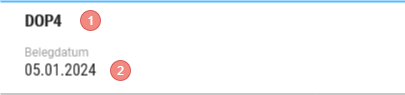
1. N° du document
2. Date du document
 
#### Menu kebab ([![image.png](https://fr.wiki.dedesales.de/uploads/images/gallery/2026-09/Zp3WWTLsIQQE7qkW-hpximage.png)](https://wiki.dedesales.de/uploads/images/gallery/2025-02/hpximage.png))


<table id="bkmrk-typ-men%C3%BCpunkt-erl%C3%A4ut-1" style="border-collapse:collapse;width:100%;height:126.781px;"><colgroup><col style="width:5.24434%;"></col><col style="width:31.2214%;"></col><col style="width:63.5343%;"></col></colgroup> <thead> <tr style="height:29.7969px;"> <td style="height:29.7969px;">Type</td> <td style="height:29.7969px;">Point de menu</td> <td style="height:29.7969px;">Explication</td> </tr> </thead> <tbody> <tr style="height:96.9844px;"> <td style="height:96.9844px;">  
</td> <td style="height:96.9844px;">Infos supplém. document</td> <td style="height:96.9844px;">S’affiche si des données sont disponibles.

- Les clés pour lesquelles les infos supplém. document doivent être affichées peuvent être gérées via Configuration de base \\ Table de codes \\ Infos supplém. document.
- Si les infos supplém. document concernent les lignes produits individuelles, le produit doit être sélectionné au préalable.
 
 </td> </tr> </tbody> </table>

##### Définition des colonnes

<table id="bkmrk-bezeichnung-sichtbar-2" style="border-collapse:collapse;width:100%;height:268.172px;"><colgroup><col style="width:28.7247%;"></col><col style="width:14.6603%;"></col><col style="width:11.4422%;"></col><col style="width:7.86651%;"></col><col style="width:37.4255%;"></col></colgroup> <thead> <tr style="height:29.7969px;"> <td style="height:29.7969px;">Désignation</td> <td style="height:29.7969px;">Visible</td> <td style="height:29.7969px;">Tri</td> <td style="height:29.7969px;">Texte complet</td> <td style="height:29.7969px;">Explication</td> </tr> </thead> <tbody> <tr style="height:29.7969px;"> <td style="height:29.7969px;">Visuel</td> <td style="height:29.7969px;">VisibleOnlyLandscape</td> <td style="height:29.7969px;">  
</td> <td style="height:29.7969px;">  
</td> <td style="height:29.7969px;"> </td> </tr> <tr style="height:29.7969px;"> <td style="height:29.7969px;">Pos</td> <td style="height:29.7969px;">VisibleOnlyLandscape</td> <td style="height:29.7969px;">  
</td> <td style="height:29.7969px;">  
</td> <td style="height:29.7969px;"> </td> </tr> <tr style="height:29.7969px;"> <td style="height:29.7969px;">Produit</td> <td style="height:29.7969px;">VisibleOnlyLandscape</td> <td style="height:29.7969px;">  
</td> <td style="height:29.7969px;">  
</td> <td style="height:29.7969px;"> </td> </tr> <tr style="height:29.7969px;"> <td style="height:29.7969px;">Désignation</td> <td style="height:29.7969px;">Visible</td> <td style="height:29.7969px;">  
</td> <td style="height:29.7969px;">  
</td> <td style="height:29.7969px;"> </td> </tr> <tr style="height:29.7969px;"> <td style="height:29.7969px;">Quantité</td> <td style="height:29.7969px;">Visible</td> <td style="height:29.7969px;">  
</td> <td style="height:29.7969px;">  
</td> <td style="height:29.7969px;"> </td> </tr> <tr style="height:29.7969px;"> <td style="height:29.7969px;">MT TTC</td> <td style="height:29.7969px;">Visible</td> <td style="height:29.7969px;">  
</td> <td style="height:29.7969px;">  
</td> <td style="height:29.7969px;"> </td> </tr> <tr style="height:29.7969px;"> <td style="height:29.7969px;">Lot</td> <td style="height:29.7969px;">Hidden</td> <td style="height:29.7969px;">  
</td> <td style="height:29.7969px;">  
</td> <td style="height:29.7969px;"> </td> </tr> <tr style="height:29.7969px;"> <td style="height:29.7969px;">Montant</td> <td style="height:29.7969px;">Visible</td> <td style="height:29.7969px;">  
</td> <td style="height:29.7969px;">  
</td> <td style="height:29.7969px;"> </td> </tr> </tbody> </table>

##### Ligne de total en bas de la grille


<details id="bkmrk-faq-wie-steuere-ich-"> <summary>FAQ</summary>

 </details><details id="bkmrk-release-ab-version-1"> <summary>Version</summary>

#### À partir de la version 16

Le dernier choix du type de document est enregistré et réutilisé lors du prochain appel, sauf si un type de document explicite est spécifié lors de l’appel.

</details>

# Facture / Avoir / Avis de prélèvement

### Données d'en-tête

#### Grille

<table id="bkmrk-click-swipe-ansichte" style="border-collapse:collapse;width:100%;"><colgroup><col style="width:33.3731%;"></col><col style="width:33.3731%;"></col><col style="width:33.3731%;"></col></colgroup> <thead> <tr> <td>Clic</td> <td>Glisser</td> <td>Vues</td> </tr> </thead> <tbody> <tr> <td>Lignes article</td> <td>1. "Flux de document" (à partir de la version 20)
 
 </td> <td>1. Tableaux
 
 </td> </tr> </tbody> </table>

##### Définition des colonnes

<table id="bkmrk-bezeichnung-sichtbar" style="border-collapse:collapse;width:100%;height:510.344px;"><colgroup><col style="width:28.7247%;"></col><col style="width:14.6603%;"></col><col style="width:11.4401%;"></col><col style="width:7.86864%;"></col><col style="width:37.4255%;"></col></colgroup> <thead> <tr style="height:29.7969px;"> <td style="height:29.7969px;">Désignation</td> <td style="height:29.7969px;">Visible</td> <td style="height:29.7969px;">Tri</td> <td style="height:29.7969px;">Texte complet</td> <td style="height:29.7969px;">Explication</td> </tr> </thead> <tbody> <tr style="height:29.7969px;"> <td style="height:29.7969px;">Numéro</td> <td style="height:29.7969px;">Visible</td> <td style="height:29.7969px;">DESC</td> <td style="height:29.7969px;">Oui</td> <td style="height:29.7969px;">  
</td> </tr> <tr style="height:29.7969px;"> <td style="height:29.7969px;">Date</td> <td style="height:29.7969px;">Visible</td> <td style="height:29.7969px;">  
</td> <td style="height:29.7969px;">  
</td> </tr> <tr style="height:46.5938px;"> <td style="height:46.5938px;">Type de facturation</td> <td style="height:46.5938px;">VisibleOnlyLandscape</td> <td style="height:46.5938px;">  
</td> <td style="height:46.5938px;">  
</td> </tr> <tr style="height:29.7969px;"> <td style="height:29.7969px;">Type de commande</td> <td style="height:29.7969px;">Caché</td> <td style="height:29.7969px;">  
</td> <td style="height:29.7969px;">  
</td> <td style="height:29.7969px;">À partir de la version 18  
</td> </tr> <tr style="height:29.7969px;"> <td style="height:29.7969px;">Motif de commande</td> <td style="height:29.7969px;">Caché</td> <td style="height:29.7969px;">  
</td> <td style="height:29.7969px;">  
</td> <td style="height:29.7969px;">À partir de la version 18  
</td> </tr> <tr style="height:29.7969px;"> <td style="height:29.7969px;">MT TTC</td> <td style="height:29.7969px;">Visible</td> <td style="height:29.7969px;">  
</td> <td style="height:29.7969px;">  
</td> </tr> <tr style="height:46.5938px;"> <td style="height:46.5938px;">Numéro de document client</td> <td style="height:46.5938px;">VisibleOnlyLandscape</td> <td style="height:46.5938px;">  
</td> <td style="height:46.5938px;">Oui</td> <td style="height:46.5938px;">  
</td> </tr> <tr style="height:29.7969px;"> <td style="height:29.7969px;">Date de comptabilisation</td> <td style="height:29.7969px;">Caché</td> <td style="height:29.7969px;">  
</td> <td style="height:29.7969px;">  
</td> </tr> <tr style="height:29.7969px;"> <td style="height:29.7969px;">Date de valeur</td> <td style="height:29.7969px;">Caché</td> <td style="height:29.7969px;">  
</td> <td style="height:29.7969px;">  
</td> </tr> <tr style="height:29.7969px;"> <td style="height:29.7969px;">Mandant</td> <td style="height:29.7969px;">Caché</td> <td style="height:29.7969px;">  
</td> <td style="height:29.7969px;">  
</td> <td style="height:29.7969px;">À partir de la version 16  
</td> </tr> <tr style="height:29.7969px;"> <td style="height:29.7969px;">Beleg.Faktura.Attribut1  
</td> <td style="height:29.7969px;">Caché</td> <td style="height:29.7969px;">  
</td> <td style="height:29.7969px;">  
</td> <td style="height:29.7969px;">À partir de la version 18  
</td> </tr> <tr style="height:29.7969px;"> <td style="height:29.7969px;">Beleg.Faktura.Attribut2  
</td> <td style="height:29.7969px;">Caché</td> <td style="height:29.7969px;">  
</td> <td style="height:29.7969px;">  
</td> <td style="height:29.7969px;">À partir de la version 18  
</td> </tr> <tr style="height:29.7969px;"> <td style="height:29.7969px;">Beleg.Faktura.Attribut3  
</td> <td style="height:29.7969px;">Caché</td> <td style="height:29.7969px;">  
</td> <td style="height:29.7969px;">  
</td> <td style="height:29.7969px;">À partir de la version 18  
</td> </tr> <tr style="height:29.7969px;"> <td style="height:29.7969px;">Beleg.Faktura.Attribut4  
</td> <td style="height:29.7969px;">Caché</td> <td style="height:29.7969px;">  
</td> <td style="height:29.7969px;">  
</td> <td style="height:29.7969px;">À partir de la version 18  
</td> </tr> <tr style="height:29.7969px;"> <td style="height:29.7969px;">Beleg.Faktura.Attribut5  
</td> <td style="height:29.7969px;">Caché</td> <td style="height:29.7969px;">  
</td> <td style="height:29.7969px;">  
</td> <td style="height:29.7969px;">À partir de la version 18  
</td> </tr> </tbody> </table>

### Lignes article

<div id="bkmrk-kopf">En-tête</div>- N° du document Type de facturation
- Date du document
- Type de commande
- Motif de commande
- Numéro de document client
 
#### Menu kebab ([![image.png](https://fr.wiki.dedesales.de/uploads/images/gallery/2026-09/Zp3WWTLsIQQE7qkW-hpximage.png)](https://wiki.dedesales.de/uploads/images/gallery/2025-02/hpximage.png))


<table id="bkmrk-typ-men%C3%BCpunkt-erl%C3%A4ut" style="border-collapse:collapse;width:100%;height:107.391px;"><colgroup><col style="width:5.24434%;"></col><col style="width:31.2277%;"></col><col style="width:63.528%;"></col></colgroup> <thead> <tr style="height:29.7969px;"> <td style="height:29.7969px;">Type</td> <td style="height:29.7969px;">Menu</td> <td style="height:29.7969px;">Explication</td> </tr> </thead> <tbody> <tr style="height:33.7969px;"> <td style="height:33.7969px;">![Peut être activé et désactivé.](https://fr.wiki.dedesales.de/uploads/images/gallery/2026-09/0wQwQKh4oke5aOzX-3lrej9amvpkhzlxv-n5zimage.png)</td> <td style="height:33.7969px;">Infos supplém. document</td> <td style="height:33.7969px;">Affiche des champs définis individuellement pour l'en-tête du document</td> </tr> <tr style="height:10px;"> <td style="height:10px;">![Peut être activé et désactivé.](https://fr.wiki.dedesales.de/uploads/images/gallery/2026-09/0wQwQKh4oke5aOzX-3lrej9amvpkhzlxv-n5zimage.png)

 </td> <td style="height:10px;">Client</td> <td style="height:10px;">S'affiche uniquement si on vient de l'aperçu du Tableau de bord</td> </tr> <tr style="height:33.7969px;"> <td style="height:33.7969px;">![Peut être activé et désactivé.](https://fr.wiki.dedesales.de/uploads/images/gallery/2026-09/0wQwQKh4oke5aOzX-3lrej9amvpkhzlxv-n5zimage.png)

 </td> <td style="height:33.7969px;">Flux de document</td> <td style="height:33.7969px;">à partir de la version 20</td> </tr> </tbody> </table>

#### Grille

<table id="bkmrk-click-swipe-ansichte-1" style="border-collapse:collapse;width:100%;"><colgroup><col style="width:33.3731%;"></col><col style="width:33.3731%;"></col><col style="width:33.3731%;"></col></colgroup> <thead> <tr> <td>Clic</td> <td>Glisser</td> <td>Vues</td> </tr> </thead> <tbody> <tr> <td>Détails de la ligne</td> <td> </td> <td>1. Tableaux
 
 </td> </tr> <tr> <td>Pied de page</td> <td>  
</td> <td>Somme (MT TTC)  
</td> </tr> </tbody> </table>

##### Définition des colonnes

<table id="bkmrk-bezeichnung-sichtbar-1" style="border-collapse:collapse;width:100%;height:297.969px;"><colgroup><col style="width:28.7247%;"></col><col style="width:14.6603%;"></col><col style="width:11.4401%;"></col><col style="width:7.86864%;"></col><col style="width:37.4255%;"></col></colgroup> <thead> <tr style="height:29.7969px;"> <td style="height:29.7969px;">Désignation</td> <td style="height:29.7969px;">Visible</td> <td style="height:29.7969px;">Tri</td> <td style="height:29.7969px;">Texte complet</td> <td style="height:29.7969px;">Explication</td> </tr> </thead> <tbody> <tr style="height:29.7969px;"> <td style="height:29.7969px;">Visuel</td> <td style="height:29.7969px;">VisibleOnlyLandscape</td> <td style="height:29.7969px;">  
</td> <td style="height:29.7969px;">  
</td> </tr> <tr style="height:29.7969px;"> <td style="height:29.7969px;">Poste</td> <td style="height:29.7969px;">VisibleOnlyLandscape</td> <td style="height:29.7969px;">ASC</td> <td style="height:29.7969px;">  
</td> <td style="height:29.7969px;">  
</td> </tr> <tr style="height:29.7969px;"> <td style="height:29.7969px;">Produit</td> <td style="height:29.7969px;">VisibleOnlyLandscape</td> <td style="height:29.7969px;">  
</td> <td style="height:29.7969px;">Oui</td> <td style="height:29.7969px;">  
</td> </tr> <tr style="height:29.7969px;"> <td style="height:29.7969px;">Désignation</td> <td style="height:29.7969px;">Visible</td> <td style="height:29.7969px;">  
</td> <td style="height:29.7969px;">Oui</td> <td style="height:29.7969px;">  
</td> </tr> <tr style="height:29.7969px;"> <td style="height:29.7969px;">Quantité</td> <td style="height:29.7969px;">Visible</td> <td style="height:29.7969px;">  
</td> <td style="height:29.7969px;">  
</td> </tr> <tr style="height:29.7969px;"> <td style="height:29.7969px;">MT TTC</td> <td style="height:29.7969px;">Visible</td> <td style="height:29.7969px;">  
</td> <td style="height:29.7969px;">  
</td> </tr> <tr style="height:29.7969px;"> <td style="height:29.7969px;">Lot</td> <td style="height:29.7969px;">Caché</td> <td style="height:29.7969px;">  
</td> <td style="height:29.7969px;">  
</td> </tr> <tr> <td>Somme</td> <td>Caché</td> <td>  
</td> <td>  
</td> <td>doit être affiché si le pied de page doit afficher la somme du document</td> </tr> </tbody> </table>

### Détails de la ligne

<div id="bkmrk-zeigt-alle-daten-der">Affiche toutes les données de la ligne</div>#### Menu kebab ([![image.png](https://fr.wiki.dedesales.de/uploads/images/gallery/2026-09/Zp3WWTLsIQQE7qkW-hpximage.png)](https://wiki.dedesales.de/uploads/images/gallery/2025-02/hpximage.png))


<div id="bkmrk-typ-men%C3%BCpunkt-erl%C3%A4ut-1"> <table style="border-collapse:collapse;width:100%;height:111.766px;"><colgroup><col style="width:5.24434%;"></col><col style="width:31.2277%;"></col><col style="width:63.528%;"></col></colgroup> <thead> <tr style="height:29.7969px;"> <td style="height:29.7969px;">Type</td> <td style="height:29.7969px;">Menu</td> <td style="height:29.7969px;">Explication</td> </tr> </thead> <tbody> <tr style="height:33.7969px;"> <td style="height:33.7969px;">![Peut être activé et désactivé.](https://fr.wiki.dedesales.de/uploads/images/gallery/2026-09/0wQwQKh4oke5aOzX-3lrej9amvpkhzlxv-n5zimage.png)</td> <td style="height:33.7969px;">Infos supplém. document</td> <td style="height:33.7969px;">Affiche des champs définis individuellement pour l'en-tête du document

- Les clés pour lesquelles les Infos supplém. document doivent être affichées peuvent être gérées via Configuration de base \\ Tableaux de codes \\ Infos supplém. document.
- Si les Infos supplém. document concernent les lignes produit individuelles, le produit doit d'abord être sélectionné.
 
 </td> </tr> <tr style="height:14.375px;"> <td style="height:14.375px;">![Peut être activé et désactivé.](https://fr.wiki.dedesales.de/uploads/images/gallery/2026-09/0wQwQKh4oke5aOzX-3lrej9amvpkhzlxv-n5zimage.png)

 </td> <td style="height:14.375px;">Au produit</td> <td style="height:14.375px;"> </td> </tr> <tr style="height:33.7969px;"> <td style="height:33.7969px;">![Peut être activé et désactivé.](https://fr.wiki.dedesales.de/uploads/images/gallery/2026-09/0wQwQKh4oke5aOzX-3lrej9amvpkhzlxv-n5zimage.png)

 </td> <td style="height:33.7969px;">Flux de document</td> <td style="height:33.7969px;">à partir de la version 20</td> </tr> </tbody> </table>

   
</div><details id="bkmrk-faq-wie-steuere-ich-"> <summary>FAQ</summary>

##### Pourquoi les Infos supplém. document sont-elles grisées ?

Si les Infos supplém. document sont fournies par le système ERP mais ne s'affichent pas dans le client, il se peut qu'aucune entrée dans les Tableaux de codes n'ait été créée. Veuillez contacter votre administrateur backend et lui demander de créer les [Tableaux de codes](https://wiki.dedesales.de/link/403#bkmrk-typ-men%C3%BCpunkt-erl%C3%A4ut-1) correspondants.

 </details><details id="bkmrk-release-ab-version-1"> <summary>Release</summary>

</details>

# Commande / Contrat

### Données d'en-tête

#### Grille

<table id="bkmrk-click-swipe-ansichte" style="width:103.81%;"><colgroup><col style="width:17.8022%;"></col><col style="width:54.9451%;"></col><col style="width:27.2527%;"></col></colgroup> <thead> <tr> <td>Cliquez</td> <td>Glissez</td> <td>Vues</td> </tr> </thead> <tbody> <tr> <td>Lignes article</td> <td>1. "Flux du document" (à partir de la version 20)
 
 </td> <td>1. Tableaux
 
 </td> </tr> </tbody> </table>

##### Définition des colonnes

<table id="bkmrk-bezeichnung-sichtbar" style="width:116.667%;height:540.141px;"><colgroup><col style="width:28.164%;"></col><col style="width:26.9162%;"></col><col style="width:15.1515%;"></col><col style="width:11.5865%;"></col><col style="width:18.1818%;"></col></colgroup> <thead> <tr style="height:29.7969px;"> <td style="height:29.7969px;">Désignation</td> <td style="height:29.7969px;">Visible</td> <td style="height:29.7969px;">Tri</td> <td style="height:29.7969px;">Texte complet</td> <td style="height:29.7969px;">Explication</td> </tr> </thead> <tbody> <tr> <td>Statut</td> <td>  
</td> <td>  
</td> <td>  
</td> <td>Rouge : si un motif d'annulation est présent

Jaune : si la Qté livrée &lt; que la quantité de la ligne

 </td> </tr> <tr style="height:29.7969px;"> <td style="height:29.7969px;">Numéro</td> <td style="height:29.7969px;">Visible</td> <td style="height:29.7969px;">DESC</td> <td style="height:29.7969px;">Oui</td> <td style="height:29.7969px;">  
</td> </tr> <tr style="height:29.7969px;"> <td style="height:29.7969px;">Date</td> <td style="height:29.7969px;">Visible</td> <td style="height:29.7969px;">  
</td> <td style="height:29.7969px;">  
</td> </tr> <tr style="height:29.7969px;"> <td style="height:29.7969px;">Date de livraison

 </td> <td style="height:29.7969px;">Visible</td> <td style="height:29.7969px;">  
</td> <td style="height:29.7969px;">  
</td> </tr> <tr style="height:29.7969px;"> <td style="height:29.7969px;">Type de commande</td> <td style="height:29.7969px;">VisibleOnlyLandscape</td> <td style="height:29.7969px;">  
</td> <td style="height:29.7969px;">Oui</td> <td style="height:29.7969px;">  
</td> </tr> <tr style="height:29.7969px;"> <td style="height:29.7969px;">Motif de commande</td> <td style="height:29.7969px;">Caché</td> <td style="height:29.7969px;">  
</td> <td style="height:29.7969px;">  
</td> </tr> <tr style="height:63.3906px;"> <td style="height:63.3906px;">Statut</td> <td style="height:63.3906px;">VisibleOnlyLandscape</td> <td style="height:63.3906px;">  
</td> <td style="height:63.3906px;">  
</td> <td style="height:63.3906px;">Encours

En cours de traitement

Terminé

 </td> </tr> <tr style="height:29.7969px;"> <td style="height:29.7969px;">MT TTC</td> <td style="height:29.7969px;">Visible</td> <td style="height:29.7969px;">  
</td> <td style="height:29.7969px;">  
</td> </tr> <tr style="height:29.7969px;"> <td style="height:29.7969px;">Numéro de document client</td> <td style="height:29.7969px;">VisibleOnlyLandscape</td> <td style="height:29.7969px;">  
</td> <td style="height:29.7969px;">Oui</td> <td style="height:29.7969px;">  
</td> </tr> <tr style="height:29.7969px;"> <td style="height:29.7969px;">Mandant</td> <td style="height:29.7969px;">Caché</td> <td style="height:29.7969px;">  
</td> <td style="height:29.7969px;">  
</td> <td style="height:29.7969px;">À partir de la version 16  
</td> </tr> <tr style="height:29.7969px;"> <td style="height:29.7969px;">Beleg.Auftrag.Attribut1  
</td> <td style="height:29.7969px;">Caché</td> <td style="height:29.7969px;">  
</td> <td style="height:29.7969px;">  
</td> <td style="height:29.7969px;">À partir de la version 16  
</td> </tr> <tr style="height:29.7969px;"> <td style="height:29.7969px;">Beleg.Auftrag.Attribut2  
</td> <td style="height:29.7969px;">Caché</td> <td style="height:29.7969px;">  
</td> <td style="height:29.7969px;">  
</td> <td style="height:29.7969px;">À partir de la version 16  
</td> </tr> <tr style="height:29.7969px;"> <td style="height:29.7969px;">Beleg.Auftrag.Attribut3  
</td> <td style="height:29.7969px;">Caché</td> <td style="height:29.7969px;">  
</td> <td style="height:29.7969px;">  
</td> <td style="height:29.7969px;">À partir de la version 16  
</td> </tr> <tr style="height:29.7969px;"> <td style="height:29.7969px;">Beleg.Auftrag.Attribut4  
</td> <td style="height:29.7969px;">Caché</td> <td style="height:29.7969px;">  
</td> <td style="height:29.7969px;">  
</td> <td style="height:29.7969px;">À partir de la version 16  
</td> </tr> <tr style="height:29.7969px;"> <td style="height:29.7969px;">Beleg.Auftrag.Attribut5  
</td> <td style="height:29.7969px;">Caché</td> <td style="height:29.7969px;">  
</td> <td style="height:29.7969px;">  
</td> <td style="height:29.7969px;">À partir de la version 16  
</td> </tr> </tbody> </table>

### Lignes article

<div id="bkmrk-kopf">En-tête</div>- N° du document
- Date du document
- Type de commande
- Motif de commande
- Numéro de document client
- Date de livraison
 
#### Menu kebab ([![image.png](https://fr.wiki.dedesales.de/uploads/images/gallery/2026-09/Zp3WWTLsIQQE7qkW-hpximage.png)](https://wiki.dedesales.de/uploads/images/gallery/2025-02/hpximage.png))


<table id="bkmrk-typ-men%C3%BCpunkt-erl%C3%A4ut" style="width:104.524%;"><colgroup><col style="width:5.58659%;"></col><col style="width:24.7207%;"></col><col style="width:69.6927%;"></col></colgroup> <thead> <tr> <td>Type</td> <td>Point de menu</td> <td>Explication</td> </tr> </thead> <tbody> <tr> <td>![Peut être activé et désactivé.](https://fr.wiki.dedesales.de/uploads/images/gallery/2026-09/0wQwQKh4oke5aOzX-3lrej9amvpkhzlxv-n5zimage.png)</td> <td>Infos supplém. document</td> <td>Affiche des champs définis individuellement pour l'en-tête du document

- Les clés pour lesquelles les Infos supplém. document doivent être affichées peuvent être gérées via Configuration de base \\ Tableaux de codes \\ Infos supplém. document.
- Si les Infos supplém. document concernent les lignes produit individuelles, le produit doit d'abord être sélectionné.
 
 </td> </tr> <tr> <td>![Peut être activé et désactivé.](https://fr.wiki.dedesales.de/uploads/images/gallery/2026-09/0wQwQKh4oke5aOzX-3lrej9amvpkhzlxv-n5zimage.png)

 </td> <td>Client</td> <td>N'est affiché que si l'on vient de l'aperçu du Tableau de bord</td> </tr> <tr> <td>![Peut être activé et désactivé.](https://fr.wiki.dedesales.de/uploads/images/gallery/2026-09/0wQwQKh4oke5aOzX-3lrej9amvpkhzlxv-n5zimage.png)

 </td> <td>Flux du document</td> <td>à partir de la version 20</td> </tr> </tbody> </table>

#### Grille

<table id="bkmrk-click-swipe-ansichte-1" style="width:102.143%;"><colgroup><col style="width:18.022%;"></col><col style="width:39.4273%;"></col><col style="width:42.6698%;"></col></colgroup> <thead> <tr> <td>Cliquez</td> <td>Glissez</td> <td>Vues</td> </tr> </thead> <tbody> <tr> <td>Détails de la ligne</td> <td> </td> <td>1. Tableaux
 
 </td> </tr> <tr> <td>Pied de page</td> <td>  
</td> <td>Somme (MT TTC)  
</td> </tr> </tbody> </table>

##### Définition des colonnes

<table id="bkmrk-bezeichnung-sichtbar-1" style="width:100%;height:391.157px;"><colgroup><col style="width:15.3754%;"></col><col style="width:19.7855%;"></col><col style="width:8.58164%;"></col><col style="width:20.8348%;"></col><col style="width:35.4227%;"></col></colgroup> <thead> <tr style="height:46.5938px;"> <td style="height:46.5938px;">Désignation</td> <td style="height:46.5938px;">Visible</td> <td style="height:46.5938px;">Tri</td> <td style="height:46.5938px;">Texte complet</td> <td style="height:46.5938px;">Explication</td> </tr> </thead> <tbody> <tr style="height:29.7969px;"> <td style="height:29.7969px;">Visuel</td> <td style="height:29.7969px;">VisibleOnlyLandscape</td> <td style="height:29.7969px;">  
</td> <td style="height:29.7969px;">  
</td> </tr> <tr style="height:29.7969px;"> <td style="height:29.7969px;">Ligne</td> <td style="height:29.7969px;">VisibleOnlyLandscape</td> <td style="height:29.7969px;">ASC</td> <td style="height:29.7969px;">  
</td> <td style="height:29.7969px;">  
</td> </tr> <tr style="height:29.7969px;"> <td style="height:29.7969px;">Produit</td> <td style="height:29.7969px;">VisibleOnlyLandscape</td> <td style="height:29.7969px;">  
</td> <td style="height:29.7969px;">Oui</td> <td style="height:29.7969px;">  
</td> </tr> <tr style="height:29.7969px;"> <td style="height:29.7969px;">Désignation</td> <td style="height:29.7969px;">Visible</td> <td style="height:29.7969px;">  
</td> <td style="height:29.7969px;">Oui</td> <td style="height:29.7969px;">  
</td> </tr> <tr style="height:29.7969px;"> <td style="height:29.7969px;">Quantité</td> <td style="height:29.7969px;">Visible</td> <td style="height:29.7969px;">  
</td> <td style="height:29.7969px;">  
</td> </tr> <tr style="height:29.7969px;"> <td style="height:29.7969px;">Livré</td> <td style="height:29.7969px;">Caché</td> <td style="height:29.7969px;">  
</td> <td style="height:29.7969px;">  
</td> </tr> <tr style="height:29.7969px;"> <td style="height:29.7969px;">En cours de traitement  
</td> <td style="height:29.7969px;">Caché</td> <td style="height:29.7969px;">  
</td> <td style="height:29.7969px;">  
</td> </tr> <tr style="height:29.7969px;"> <td style="height:29.7969px;">MT TTC</td> <td style="height:29.7969px;">Visible</td> <td style="height:29.7969px;">  
</td> <td style="height:29.7969px;">  
</td> </tr> <tr style="height:29.7969px;"> <td style="height:29.7969px;">Annulé</td> <td style="height:29.7969px;">Caché</td> <td style="height:29.7969px;">  
</td> <td style="height:29.7969px;">  
</td> </tr> <tr> <td>Motif d'annulation</td> <td>Caché</td> <td>  
</td> <td>  
</td> <td>  
</td> </tr> <tr style="height:29.7969px;"> <td style="height:29.7969px;">Lot</td> <td style="height:29.7969px;">Caché</td> <td style="height:29.7969px;">  
</td> <td style="height:29.7969px;">  
</td> </tr> <tr style="height:46.5938px;"> <td style="height:46.5938px;">Montant</td> <td style="height:46.5938px;">Caché</td> <td style="height:46.5938px;">  
</td> <td style="height:46.5938px;">  
</td> <td style="height:46.5938px;">doit être affiché si le pied de page doit afficher la somme du document</td> </tr> </tbody> </table>

### Détails de la ligne

<div id="bkmrk-zeigt-alle-daten-der">Affiche toutes les données de la ligne</div>#### Menu kebab ([![image.png](https://fr.wiki.dedesales.de/uploads/images/gallery/2026-09/Zp3WWTLsIQQE7qkW-hpximage.png)](https://wiki.dedesales.de/uploads/images/gallery/2025-02/hpximage.png))


<div id="bkmrk-typ-men%C3%BCpunkt-erl%C3%A4ut-1"> <table style="width:101.19%;"> <thead> <tr> <td>Type</td> <td>Point de menu</td> <td>Explication</td> </tr> </thead> <tbody> <tr> <td>![Peut être activé et désactivé.](https://fr.wiki.dedesales.de/uploads/images/gallery/2026-09/0wQwQKh4oke5aOzX-3lrej9amvpkhzlxv-n5zimage.png)</td> <td>Infos supplém. document</td> <td>Affiche des champs définis individuellement pour l'en-tête du document</td> </tr> <tr> <td>![Peut être activé et désactivé.](https://fr.wiki.dedesales.de/uploads/images/gallery/2026-09/0wQwQKh4oke5aOzX-3lrej9amvpkhzlxv-n5zimage.png)

 </td> <td>Au produit</td> <td> </td> </tr> <tr> <td>![Peut être activé et désactivé.](https://fr.wiki.dedesales.de/uploads/images/gallery/2026-09/0wQwQKh4oke5aOzX-3lrej9amvpkhzlxv-n5zimage.png)

 </td> <td>Flux du document</td> <td>à partir de la version 20</td> </tr> </tbody> </table>

 </div><details id="bkmrk-faq-warum-sind-die-b"> <summary>FAQ</summary>

##### Pourquoi les Infos supplém. document sont-elles grisées ?

Si les Infos supplém. document sont fournies par le système ERP mais ne s'affichent pas dans le client, il se peut qu'aucune entrée dans les Tableaux de codes n'ait été créée. Contactez votre administrateur backend et demandez-lui de créer les [Tableaux de codes](https://wiki.dedesales.de/link/404#bkmrk-typ-men%C3%BCpunkt-erl%C3%A4ut) correspondants.

</details>

# Offre

### Données d'en-tête

#### Grille

<table id="bkmrk-click-swipe-ansichte" style="width:110.238%;"><colgroup><col style="width:17.8022%;"></col><col style="width:54.9451%;"></col><col style="width:27.2527%;"></col></colgroup> <thead> <tr> <td>Clic</td> <td>Glisser</td> <td>Vues</td> </tr> </thead> <tbody> <tr> <td>Lignes article</td> <td> </td> <td>1. Tableaux
 
 </td> </tr> </tbody> </table>

##### Définition des colonnes

<table id="bkmrk-bezeichnung-sichtbar" style="width:116.31%;"><colgroup><col style="width:27.9445%;"></col><col style="width:26.5385%;"></col><col style="width:14.9389%;"></col><col style="width:11.4239%;"></col><col style="width:19.1569%;"></col></colgroup> <thead> <tr> <td>Désignation</td> <td>Visible</td> <td>Tri</td> <td>Texte complet</td> <td>Explication</td> </tr> </thead> <tbody> <tr> <td>Numéro</td> <td>Visible</td> <td>DESC</td> <td>Oui</td> <td>  
</td> </tr> <tr> <td>Date</td> <td>Visible</td> <td>  
</td> <td>  
</td> <td>  
</td> </tr> <tr> <td>Type d'offre

 </td> <td>VisibleOnlyLandscape</td> <td>  
</td> <td>  
</td> <td>  
</td> </tr> <tr> <td>Statut</td> <td>VisibleOnlyLandscape</td> <td>  
</td> <td>  
</td> <td>Encours

En cours de traitement

Terminé

 </td> </tr> <tr> <td>MT TTC</td> <td>Visible</td> <td>  
</td> <td>  
</td> <td>  
</td> </tr> <tr> <td>Numéro de document client</td> <td>VisibleOnlyLandscape</td> <td>  
</td> <td>Oui</td> <td>  
</td> </tr> <tr> <td>Mandant</td> <td>Hidden</td> <td>  
</td> <td>  
</td> <td>À partir de la version 16  
</td> </tr> <tr> <td>Beleg.Angebot.Attribut1  
</td> <td>Hidden</td> <td>  
</td> <td>  
</td> <td>À partir de la version 16  
</td> </tr> <tr> <td>Beleg.Angebot.Attribut2  
</td> <td>Hidden</td> <td>  
</td> <td>  
</td> <td>À partir de la version 18  
</td> </tr> <tr> <td>Beleg.Angebot.Attribut3  
</td> <td>Hidden</td> <td>  
</td> <td>  
</td> <td>À partir de la version 18  
</td> </tr> <tr> <td>Beleg.Angebot.Attribut4  
</td> <td>Hidden</td> <td>  
</td> <td>  
</td> <td>À partir de la version 18  
</td> </tr> <tr> <td>Beleg.Angebot.Attribut5  
</td> <td>Hidden</td> <td>  
</td> <td>  
</td> <td>À partir de la version 18  
</td> </tr> </tbody> </table>

### Lignes article

<div id="bkmrk-kopf">En-tête</div>- N° du document
- Date du document
- Type de commande
- Motif de commande
 
#### Menu kebab ([![image.png](https://fr.wiki.dedesales.de/uploads/images/gallery/2026-09/Zp3WWTLsIQQE7qkW-hpximage.png)](https://wiki.dedesales.de/uploads/images/gallery/2025-02/hpximage.png))


<table id="bkmrk-typ-men%C3%BCpunkt-erl%C3%A4ut" style="width:114.524%;"><colgroup><col style="width:5.58659%;"></col><col style="width:24.7207%;"></col><col style="width:69.6927%;"></col></colgroup> <thead> <tr> <td>Type</td> <td>Point de menu</td> <td>Explication</td> </tr> </thead> <tbody> <tr> <td>![Peut être activé et désactivé.](https://fr.wiki.dedesales.de/uploads/images/gallery/2026-09/0wQwQKh4oke5aOzX-3lrej9amvpkhzlxv-n5zimage.png)</td> <td>Infos supplémém. document</td> <td>Affiche des champs définis individuellement pour l'En-tête du doc.

- Via Configuration de base \\ Tableaux de codes \\ Infos supplémém. document, les clés peuvent être gérées pour lesquelles les Infos supplémém. document doivent être affichées.
- Si les Infos supplémém. document concernent les lignes de produit individuelles, le produit doit être sélectionné au préalable.
 
 </td> </tr> <tr> <td>![Peut être activé et désactivé.](https://fr.wiki.dedesales.de/uploads/images/gallery/2026-09/0wQwQKh4oke5aOzX-3lrej9amvpkhzlxv-n5zimage.png)

 </td> <td>Client</td> <td>N'est affiché que si l'on vient de l'aperçu du Tableau de bord</td> </tr> </tbody> </table>

#### Grille

<table id="bkmrk-click-swipe-ansichte-1" style="width:115%;"><colgroup><col style="width:38.6207%;"></col><col style="width:18.9655%;"></col><col style="width:42.7586%;"></col></colgroup> <thead> <tr> <td>Clic</td> <td>Glisser</td> <td>Vues</td> </tr> </thead> <tbody> <tr> <td>Détails de la ligne</td> <td> </td> <td>1. Tableaux
 
 </td> </tr> </tbody> </table>

##### Définition des colonnes

<table id="bkmrk-bezeichnung-sichtbar-1" style="width:112.738%;"><colgroup><col style="width:20%;"></col><col style="width:30.8163%;"></col><col style="width:17.3469%;"></col><col style="width:13.2653%;"></col><col style="width:18.5714%;"></col></colgroup> <thead> <tr> <td>Désignation</td> <td>Visible</td> <td>Tri</td> <td>Texte complet</td> <td>Explication</td> </tr> </thead> <tbody> <tr> <td>Visuel</td> <td>VisibleOnlyLandscape</td> <td>  
</td> <td>  
</td> <td>  
</td> </tr> <tr> <td>POS</td> <td>VisibleOnlyLandscape</td> <td>ASC</td> <td>  
</td> <td>  
</td> </tr> <tr> <td>Produit</td> <td>VisibleOnlyLandscape</td> <td>  
</td> <td>Oui</td> <td>  
</td> </tr> <tr> <td>Désignation</td> <td>Visible</td> <td>  
</td> <td>Oui</td> <td>  
</td> </tr> <tr> <td>Quantité</td> <td>Visible</td> <td>  
</td> <td>  
</td> <td>  
</td> </tr> <tr> <td>MT TTC</td> <td>Visible</td> <td>  
</td> <td>  
</td> <td>  
</td> </tr> </tbody> </table>

### Détails de la ligne

<div id="bkmrk-zeigt-alle-daten-der">Affiche toutes les données de la ligne</div>#### Menu kebab ([![image.png](https://fr.wiki.dedesales.de/uploads/images/gallery/2026-09/Zp3WWTLsIQQE7qkW-hpximage.png)](https://wiki.dedesales.de/uploads/images/gallery/2025-02/hpximage.png))


<div id="bkmrk-typ-men%C3%BCpunkt-erl%C3%A4ut-1"> <table style="width:113.214%;"> <thead> <tr> <td style="width:9.77354%;">Type</td> <td style="width:30.0677%;">Point de menu</td> <td style="width:60.1588%;">Explication</td> </tr> </thead> <tbody> <tr> <td style="width:9.77354%;">![Peut être activé et désactivé.](https://fr.wiki.dedesales.de/uploads/images/gallery/2026-09/0wQwQKh4oke5aOzX-3lrej9amvpkhzlxv-n5zimage.png)</td> <td style="width:30.0677%;">Infos supplémém. document</td> <td style="width:60.1588%;">Affiche des champs définis individuellement pour l'En-tête du doc.</td> </tr> <tr> <td style="width:9.77354%;">![Peut être activé et désactivé.](https://fr.wiki.dedesales.de/uploads/images/gallery/2026-09/0wQwQKh4oke5aOzX-3lrej9amvpkhzlxv-n5zimage.png)

 </td> <td style="width:30.0677%;">Au produit</td> <td style="width:60.1588%;"> </td> </tr> </tbody> </table>

 </div><details id="bkmrk-faq-warum-sind-die-b"> <summary>FAQ</summary>

##### Pourquoi les Infos supplémém. document sont-elles grisées ?

Si les Infos supplémém. document sont fournies par le système ERP mais ne s'affichent pas dans le client, il se peut qu'aucune entrée dans les Tableaux de codes n'ait été créée. Contactez votre administrateur backend et demandez-lui de créer les [tableaux de codes](https://wiki.dedesales.de/link/405#bkmrk-typ-men%C3%BCpunkt-erl%C3%A4ut) correspondants.

</details>

# Bon de livraison

### Données d'en-tête

#### Grille

<table id="bkmrk-click-swipe-ansichte" style="width:112.024%;"><colgroup><col style="width:31.1538%;"></col><col style="width:21.1538%;"></col><col style="width:47.6923%;"></col></colgroup> <thead> <tr> <td>Clic</td> <td>Glisser</td> <td>Vues</td> </tr> </thead> <tbody> <tr> <td>Lignes article</td> <td> </td> <td>1. Tableaux
 
 </td> </tr> </tbody> </table>

##### Définition des colonnes

<table id="bkmrk-bezeichnung-sichtbar" style="width:111.905%;"><colgroup><col style="width:28.8439%;"></col><col style="width:20.0238%;"></col><col style="width:11.2038%;"></col><col style="width:9.42988%;"></col><col style="width:30.6178%;"></col></colgroup> <thead> <tr> <td>Désignation</td> <td>Visible</td> <td>Tri</td> <td>Texte complet</td> <td>Explication</td> </tr> </thead> <tbody> <tr> <td>Numéro</td> <td>Visible</td> <td>DESC</td> <td>Oui</td> <td>  
</td> </tr> <tr> <td>Date</td> <td>Visible</td> <td>  
</td> <td>  
</td> <td>  
</td> </tr> <tr> <td>Type de livraison

 </td> <td>VisibleOnlyLandscape</td> <td>  
</td> <td>  
</td> <td>  
</td> </tr> <tr> <td>Type de commande</td> <td>Caché</td> <td>  
</td> <td>  
</td> <td> </td> </tr> <tr> <td>Motif de commande</td> <td>Caché</td> <td>  
</td> <td>  
</td> <td> </td> </tr> <tr> <td>Statut</td> <td>VisibleOnlyLandscape</td> <td>  
</td> <td>  
</td> <td>Encours

En cours de traitement (Orange)

Terminé (vert)

 </td> </tr> <tr> <td>Numéro de document client</td> <td>VisibleOnlyLandscape</td> <td>  
</td> <td>Oui</td> <td>  
</td> </tr> <tr> <td>Mandant</td> <td>Caché</td> <td>  
</td> <td>  
</td> <td>À partir de la version 16  
</td> </tr> <tr> <td>Beleg.Lieferschein.Attribut1  
</td> <td>Caché</td> <td>  
</td> <td>  
</td> <td>À partir de la version 18  
</td> </tr> <tr> <td>Beleg.Lieferschein.Attribut2  
</td> <td>Caché</td> <td>  
</td> <td>  
</td> <td>À partir de la version 18  
</td> </tr> <tr> <td>Beleg.Lieferschein.Attribut3  
</td> <td>Caché</td> <td>  
</td> <td>  
</td> <td>À partir de la version 18  
</td> </tr> <tr> <td>Beleg.Lieferschein.Attribut4  
</td> <td>Caché</td> <td>  
</td> <td>  
</td> <td>À partir de la version 18  
</td> </tr> <tr> <td>Beleg.Lieferschein.Attribut5  
</td> <td>Caché</td> <td>  
</td> <td>  
</td> <td>À partir de la version 18  
</td> </tr> </tbody> </table>

### Lignes article

<div id="bkmrk-kopf">En-tête</div>- N° du document
- Date du document
- Type de commande
- Motif de commande
 
#### Menu kebab ([![image.png](https://fr.wiki.dedesales.de/uploads/images/gallery/2026-09/Zp3WWTLsIQQE7qkW-hpximage.png)](https://wiki.dedesales.de/uploads/images/gallery/2025-02/hpximage.png))


<table id="bkmrk-typ-men%C3%BCpunkt-erl%C3%A4ut"><colgroup><col></col><col></col><col></col></colgroup> <thead> <tr> <td>Type</td> <td>Point de menu</td> <td>Explication</td> </tr> </thead> <tbody> <tr> <td>![Peut être activé et désactivé.](https://fr.wiki.dedesales.de/uploads/images/gallery/2026-09/0wQwQKh4oke5aOzX-3lrej9amvpkhzlxv-n5zimage.png)</td> <td>Infos supplém. document</td> <td>Affiche des champs définis individuellement pour l'En-tête du doc.

- Via Configuration de base \\ Tableaux de codes \\ Infos supplém. document, les clés peuvent être gérées pour lesquelles les infos supplém. document doivent être affichées.
- Si les infos supplém. document concernent les lignes de produit individuelles, le produit doit être sélectionné au préalable.
 
 </td> </tr> <tr> <td>![Peut être activé et désactivé.](https://fr.wiki.dedesales.de/uploads/images/gallery/2026-09/0wQwQKh4oke5aOzX-3lrej9amvpkhzlxv-n5zimage.png)

 </td> <td>Client</td> <td>S'affiche uniquement si on vient de l'aperçu du Tableau de bord</td> </tr> <tr> <td>![Peut être activé et désactivé.](https://fr.wiki.dedesales.de/uploads/images/gallery/2026-09/0wQwQKh4oke5aOzX-3lrej9amvpkhzlxv-n5zimage.png)

 </td> <td>Flux de document</td> <td>à partir de la version 20</td> </tr> </tbody> </table>

#### Grille

<table id="bkmrk-click-swipe-ansichte-1" style="width:94.7619%;"><colgroup><col style="width:38.6207%;"></col><col style="width:18.9655%;"></col><col style="width:42.7586%;"></col></colgroup> <thead> <tr> <td>Clic</td> <td>Glisser</td> <td>Vues</td> </tr> </thead> <tbody> <tr> <td>Détails de la ligne</td> <td> </td> <td>1. Tableaux
 
 </td> </tr> </tbody> </table>

##### Définition des colonnes

<table id="bkmrk-bezeichnung-sichtbar-1" style="width:96.5476%;height:208.578px;"><colgroup><col style="width:20%;"></col><col style="width:30.8163%;"></col><col style="width:17.3469%;"></col><col style="width:13.2653%;"></col><col style="width:18.5714%;"></col></colgroup> <thead> <tr style="height:29.7969px;"> <td style="height:29.7969px;">Désignation</td> <td style="height:29.7969px;">Visible</td> <td style="height:29.7969px;">Tri</td> <td style="height:29.7969px;">Texte complet</td> <td style="height:29.7969px;">Explication</td> </tr> </thead> <tbody> <tr style="height:29.7969px;"> <td style="height:29.7969px;">Visuel</td> <td style="height:29.7969px;">VisibleOnlyLandscape</td> <td style="height:29.7969px;">  
</td> <td style="height:29.7969px;">  
</td> </tr> <tr style="height:29.7969px;"> <td style="height:29.7969px;">Poste</td> <td style="height:29.7969px;">VisibleOnlyLandscape</td> <td style="height:29.7969px;">ASC</td> <td style="height:29.7969px;">  
</td> <td style="height:29.7969px;">  
</td> </tr> <tr style="height:29.7969px;"> <td style="height:29.7969px;">Produit</td> <td style="height:29.7969px;">VisibleOnlyLandscape</td> <td style="height:29.7969px;">  
</td> <td style="height:29.7969px;">Oui</td> <td style="height:29.7969px;">  
</td> </tr> <tr style="height:29.7969px;"> <td style="height:29.7969px;">Désignation</td> <td style="height:29.7969px;">Visible</td> <td style="height:29.7969px;">  
</td> <td style="height:29.7969px;">Oui</td> <td style="height:29.7969px;">  
</td> </tr> <tr style="height:29.7969px;"> <td style="height:29.7969px;">Quantité</td> <td style="height:29.7969px;">Visible</td> <td style="height:29.7969px;">  
</td> <td style="height:29.7969px;">  
</td> </tr> </tbody> </table>

### Détails de la ligne

<div id="bkmrk-zeigt-alle-daten-der">Affiche toutes les données de la ligne</div>#### Menu kebab ([![image.png](https://fr.wiki.dedesales.de/uploads/images/gallery/2026-09/Zp3WWTLsIQQE7qkW-hpximage.png)](https://wiki.dedesales.de/uploads/images/gallery/2025-02/hpximage.png))


<div id="bkmrk-typ-men%C3%BCpunkt-erl%C3%A4ut-1"> <table style="width:109.167%;"> <thead> <tr> <td style="width:19.1895%;">Type</td> <td style="width:34.5803%;">Point de menu</td> <td style="width:46.2302%;">Explication</td> </tr> </thead> <tbody> <tr> <td style="width:19.1895%;">![Peut être activé et désactivé.](https://fr.wiki.dedesales.de/uploads/images/gallery/2026-09/0wQwQKh4oke5aOzX-3lrej9amvpkhzlxv-n5zimage.png)</td> <td style="width:34.5803%;">Infos supplém. document</td> <td style="width:46.2302%;">Affiche des champs définis individuellement pour l'En-tête du doc.</td> </tr> <tr> <td style="width:19.1895%;">![Peut être activé et désactivé.](https://fr.wiki.dedesales.de/uploads/images/gallery/2026-09/0wQwQKh4oke5aOzX-3lrej9amvpkhzlxv-n5zimage.png)

 </td> <td style="width:34.5803%;">Au produit</td> <td style="width:46.2302%;">  
</td> </tr> <tr> <td style="width:19.1895%;">![Peut être activé et désactivé.](https://fr.wiki.dedesales.de/uploads/images/gallery/2026-09/0wQwQKh4oke5aOzX-3lrej9amvpkhzlxv-n5zimage.png)

 </td> <td style="width:34.5803%;">Flux de document</td> <td style="width:46.2302%;">à partir de la version 20</td> </tr> </tbody> </table>

 </div><details id="bkmrk-faq-warum-sind-die-b"> <summary>FAQ</summary>

##### Pourquoi les infos supplém. document sont-elles grisées ?

Si les infos supplém. document sont fournies par le système ERP mais ne s'affichent pas dans le client, il se peut qu'aucune entrée dans les Tableaux de codes n'ait été créée. Contactez votre administrateur backend et demandez-lui de créer les [tableaux de codes](https://wiki.dedesales.de/link/406#bkmrk-typ-men%C3%BCpunkt-erl%C3%A4ut) correspondants.

</details>

# Description de la prestation STATISTIQUE

# A Date

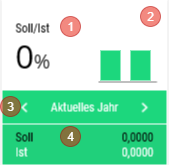
<table id="bkmrk-titel-verf%C3%BCgbar-widg" style="border-collapse:collapse;width:100%;height:388.5px;"><colgroup><col style="width:14.555%;"></col><col style="width:23.7048%;"></col><col style="width:61.7402%;"></col></colgroup> <thead> <tr style="height:29.7969px;"> <td style="height:29.7969px;">Titre</td> <td style="height:29.7969px;">Widget</td> <td style="height:29.7969px;">Description du widget</td> </tr> </thead> <tbody> <tr style="height:358.703px;"> <td style="height:358.703px;">A Date</td> <td style="height:358.703px;"><div drawio-diagram="1955"><img src="https://fr.wiki.dedesales.de/uploads/images/gallery/2026-09/ycL5UuSNgVTToc4b-xkntexuel9at0jqt-drawing-9-1754902805.png" alt="xKNtexuEl9aT0jQt-drawing-9-1754902805.png"/></div>

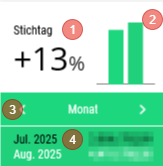
 </td> <td style="height:358.703px;">1. Modification du chiffre d'affaires en %
2. Modification du chiffre d'affaires graphique
3. Changement des variantes d'affichage "Mois" | "Mois / Année précédente" | "Année". <span class="wpaicg-chat-message"></span>
    
    La variante choisie en dernier est enregistrée et présélectionnée au prochain démarrage.
4. Affichage des chiffres concrets sur la base du choix de 3.
 
Disponible :

- Tableau de bord de la page d'accueil
- Fiche client
 
Clic :

- Passe en vue détaillée
 
Coloration du widget :

- rouge : chiffre d'affaires négatif
- vert : chiffre d'affaires positif
 
Les données concernent uniquement les clients pris en charge.

 </td> </tr> </tbody> </table>

### Généralités

#### Menu kebab ([![image.png](https://fr.wiki.dedesales.de/uploads/images/gallery/2026-09/Zp3WWTLsIQQE7qkW-hpximage.png)](https://wiki.dedesales.de/uploads/images/gallery/2025-02/hpximage.png))


<table id="bkmrk-typ-men%C3%BCpunkt-erl%C3%A4ut" style="border-collapse:collapse;width:100%;height:257.953px;"><colgroup><col style="width:5.24434%;"></col><col style="width:31.2277%;"></col><col style="width:63.528%;"></col></colgroup> <thead> <tr style="height:29.7969px;"> <td style="height:29.7969px;">Type</td> <td style="height:29.7969px;">Point de menu</td> <td style="height:29.7969px;">Explication</td> </tr> </thead> <tbody> <tr style="height:29.7969px;"> <td style="height:29.7969px;">![Un seul élément actif est possible.](https://fr.wiki.dedesales.de/uploads/images/gallery/2026-09/VVilFrk0fhot186q-jbemwch2ontcwalv-r6pimage.png)

 </td> <td style="height:29.7969px;">Année calendaire</td> <td style="height:29.7969px;">  
</td> </tr> <tr style="height:29.7969px;"> <td style="height:29.7969px;">![Un seul élément actif est possible.](https://fr.wiki.dedesales.de/uploads/images/gallery/2026-09/VVilFrk0fhot186q-jbemwch2ontcwalv-r6pimage.png)</td> <td style="height:29.7969px;">Exercice</td> <td style="height:29.7969px;">Visible uniquement si Exercice &lt;&gt; Année calendaire</td> </tr> <tr style="height:31.375px;"> <td style="height:31.375px;">![Un seul élément actif est possible.](https://fr.wiki.dedesales.de/uploads/images/gallery/2026-09/VVilFrk0fhot186q-jbemwch2ontcwalv-r6pimage.png)

 </td> <td style="height:31.375px;">A Date</td> <td style="height:31.375px;">  
</td> </tr> <tr> <td>  
</td> <td>------------------------------------ </td> <td>  
</td> </tr> <tr style="height:29.7969px;"> <td style="height:29.7969px;">  
</td> <td style="height:29.7969px;">Hiérarchie des produits</td> <td style="height:29.7969px;">  
</td> </tr> <tr> <td> </td> <td>------------------------------------ </td> <td>  
</td> </tr> <tr style="height:35.7969px;"> <td style="height:35.7969px;"> </td> <td style="height:35.7969px;">Exporter</td> <td style="height:35.7969px;">  
</td> </tr> </tbody> </table>


#### En-tête

<div drawio-diagram="1956"><img src="https://fr.wiki.dedesales.de/uploads/images/gallery/2026-09/3pL6SLAsU8aKplr4-6xco1e3lswgr0bea-drawing-9-1754902949.png" alt="6xco1E3lSWGr0bea-drawing-9-1754902949.png"/></div>

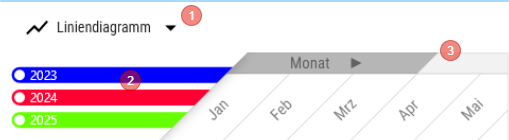
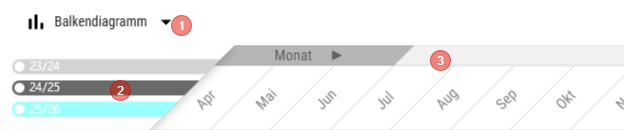
1. L'affichage du diagramme peut être basculé entre Diagramme linéaire et Diagramme à barres
2. Les dégradés de couleurs sont contrôlés via le backend
3. Lorsque le diagramme est ouvert et que tous les intervalles de temps ne peuvent pas être affichés, l'affichage défile vers la gauche pour rendre visible l'intervalle de temps actuel (par exemple, le mois). En faisant défiler, d'autres intervalles de temps peuvent être rendus visibles
 
#### Remarques 2 générales

1. La ligne de somme du tableau est toujours affichée en bas de l'écran
2. L'échelle de l'axe Y est calculée dynamiquement et s'oriente sur la valeur la plus élevée des données à afficher
 
### Grille

<table id="bkmrk-click-swipe-ansichte" style="height:101px;width:100%;"> <thead> <tr> <td style="width:15.8522%;">Clic</td> <td style="width:53.3938%;">Glissement</td> <td style="width:30.754%;">Vues</td> </tr> </thead> <tbody> <tr> <td style="width:15.8522%;"> </td> <td style="width:53.3938%;">1. <div>Par glissement, on accède à la vue des documents avec un filtre préconfiguré.</div><div>  
    </div>
2. <div>Il y a donc 3 choix de glissement</div><div>Documents &lt;Année actuelle&gt;</div><div>Documents &lt;Année précédente&gt;  
    Documents &lt;Avant-année précédente&gt;</div>
 
 </td> <td style="width:30.754%;">1\. Tableau

 </td> </tr> </tbody> </table>

### Filtre

<div id="bkmrk-1.-im-filter-kann-de">1. Dans le filtre, la période d'évaluation (début et fin) peut être choisie.</div><div id="bkmrk-a.-der-auswertungsze" style="padding-left:40px;">a. La période d'évaluation peut durer au maximum 1 an.</div><div id="bkmrk-2.-der-filter-gilt-f">2. Le filtre s'applique aussi bien au diagramme qu'au tableau.</div><div id="bkmrk-3.-automatische-ausw">3. Sélection automatique de la période</div><div id="bkmrk-a.-enth%C3%A4lt-der-gew%C3%A4h" style="padding-left:40px;">a. Si la période choisie contient moins de 32 jours, la période correspond à "Jour"</div><div id="bkmrk-b.-enth%C3%A4lt-der-gew%C3%A4h" style="padding-left:40px;">b. Si la période choisie contient moins de 93 jours, la période correspond à "Semaine"</div><div id="bkmrk-c.-in-allen-anderen-" style="padding-left:40px;">c. Dans tous les autres cas, la période correspond à "Mois".</div>##### Présentation tabulaire

<table id="bkmrk-bezeichnung-sichtbar" style="border-collapse:collapse;width:100%;"><colgroup><col style="width:43.5042%;"></col><col style="width:56.4958%;"></col></colgroup> <thead> <tr> <td>Désignation</td> <td>Explication</td> </tr> </thead> <tbody> <tr> <td>Période</td> <td> La période pour laquelle les données sont filtrées est affichée "Jour" | "Semaine" | "Mois"</td> </tr> <tr> <td><div>Colonnes annuelles</div> </td> <td><div><div>- Année calendaire à 4 chiffres
- Trois colonnes annuelles sont affichées. Au minimum autant que la période d'évaluation choisie individuellement en années.
 
 </div> </div> </td> </tr> <tr> <td>Colonnes de variation</td> <td>% de variation par rapport à la période de comparaison</td> </tr> </tbody> </table>

### Présentation du diagramme

<div id="bkmrk-1.-der-chart-zeigt-i">1. Le diagramme affiche toujours au maximum trois lignes/barres de valeurs.</div><div id="bkmrk-a.-jede-linie%2Fbalken">a. Chaque ligne/barre représente une année calendaire ou un exercice.</div><div id="bkmrk-aktuelles-jahr-%3D-far" style="padding-left:40px;">Année actuelle = dégradés de couleurs : Configuration de base \ Configuration \ Client-Chart-Couleur Année actuelle</div><div id="bkmrk-1-jahr-zur%C3%BCck-%3D-farb" style="padding-left:40px;">1 an en arrière = dégradés de couleurs : Configuration de base \ Configuration \ Client-Chart-Couleur Année précédente</div><div id="bkmrk-2-jahre-zur%C3%BCck-%3D-far" style="padding-left:40px;">2 ans en arrière = dégradés de couleurs : Configuration de base \ Configuration \ Client-Chart-Couleur il y a deux ans</div><div id="bkmrk-wird-durch-einen-ind">Si une période individuelle nécessite l'affichage de plus de trois années, seules les trois années les plus récentes sont affichées.</div><div id="bkmrk--6"></div>### Vue Hiérarchie des produits

<div id="bkmrk-1.-in-der-produkthie"><div>1. Dans la vue Hiérarchie des produits, les chiffres d'affaires sont affichés par niveau de la Hiérarchie des produits.</div><div style="padding-left:40px;">a. La colonne "Mois" est supprimée et remplacée par la Hiérarchie des produits.</div><div>2. Lorsqu'une ligne est sélectionnée dans la vue, le diagramme affiche les chiffres d'affaires de la Hiérarchie des produits choisie.</div><div style="padding-left:40px;">a. Le chiffre d'affaires affiché est calculé à partir de la hiérarchie choisie et des niveaux inférieurs.</div><div style="padding-left:40px;">b. Si aucune ligne n'est sélectionnée, le chiffre d'affaires total est affiché.</div><div>3. Les lignes derrière lesquelles se trouvent des produits sont marquées par une barre verte.</div><div>4. Glissement</div><div style="padding-left:40px;">a. Produits</div><div>5. Point triple</div><div style="padding-left:40px;">a. Sélection du mandant</div> </div>#### Produits

Liste les produits présents dans la Hiérarchie des produits et les niveaux inférieurs avec chiffre d'affaires et quantité vendue.

<table id="bkmrk-bezeichnung-sichtbar-1" style="height:345.141px;width:100%;"> <thead> <tr style="height:46.5938px;"> <td style="width:19.4279%;height:46.5938px;">Désignation</td> <td style="width:19.0703%;height:46.5938px;">Visible</td> <td style="width:8.10091%;height:46.5938px;">Tri</td> <td style="width:5.72507%;height:46.5938px;">Texte complet</td> <td style="width:47.6758%;height:46.5938px;">Explication</td> </tr> </thead> <tbody> <tr style="height:29.7969px;"> <td style="width:19.4279%;height:29.7969px;">Produit</td> <td style="width:19.0703%;height:29.7969px;">VisibleOnlyLandscape</td> <td style="width:8.10091%;height:29.7969px;">  
</td> <td style="width:5.72507%;height:29.7969px;">Oui</td> <td style="width:47.6758%;height:29.7969px;">  
</td> </tr> <tr style="height:29.7969px;"> <td style="width:19.4279%;height:29.7969px;">Désignation</td> <td style="width:19.0703%;height:29.7969px;">Visible</td> <td style="width:8.10091%;height:29.7969px;">ASC</td> <td style="width:5.72507%;height:29.7969px;">  
</td> <td style="width:47.6758%;height:29.7969px;">  
</td> </tr> <tr style="height:29.7969px;"> <td style="width:19.4279%;height:29.7969px;">Hiérarchie</td> <td style="width:19.0703%;height:29.7969px;">Hidden</td> <td style="width:8.10091%;height:29.7969px;">  
</td> <td style="width:5.72507%;height:29.7969px;">  
</td> <td style="width:47.6758%;height:29.7969px;">  
</td> </tr> <tr style="height:43.375px;"> <td style="width:19.4279%;height:43.375px;">Quantité &lt;Année actuelle&gt;</td> <td style="width:19.0703%;height:43.375px;">VisibleOnlyLandscape</td> <td style="width:8.10091%;height:43.375px;">  
</td> <td style="width:5.72507%;height:43.375px;">  
</td> <td style="width:47.6758%;height:43.375px;">  
</td> </tr> <tr style="height:46.5938px;"> <td style="width:19.4279%;height:46.5938px;">VENTES &lt;Année actuelle&gt;</td> <td style="width:19.0703%;height:46.5938px;">Visible</td> <td style="width:8.10091%;height:46.5938px;">  
</td> <td style="width:5.72507%;height:46.5938px;">  
</td> <td style="width:47.6758%;height:46.5938px;">  
</td> </tr> <tr style="height:29.7969px;"> <td style="width:19.4279%;height:29.7969px;">Quantité &lt;Année précédente&gt;</td> <td style="width:19.0703%;height:29.7969px;">VisibleOnlyLandscape</td> <td style="width:8.10091%;height:29.7969px;">  
</td> <td style="width:5.72507%;height:29.7969px;">  
</td> <td style="width:47.6758%;height:29.7969px;">  
</td> </tr> <tr style="height:29.7969px;"> <td style="width:19.4279%;height:29.7969px;">VENTES &lt;Année précédente&gt;</td> <td style="width:19.0703%;height:29.7969px;">Visible</td> <td style="width:8.10091%;height:29.7969px;">  
</td> <td style="width:5.72507%;height:29.7969px;">  
</td> <td style="width:47.6758%;height:29.7969px;">  
</td> </tr> <tr style="height:29.7969px;"> <td style="width:19.4279%;height:29.7969px;">Quantité &lt;Avant-année précédente&gt;</td> <td style="width:19.0703%;height:29.7969px;">VisibleOnlyLandscape</td> <td style="width:8.10091%;height:29.7969px;">  
</td> <td style="width:5.72507%;height:29.7969px;">  
</td> <td style="width:47.6758%;height:29.7969px;">  
</td> </tr> <tr style="height:29.7969px;"> <td style="width:19.4279%;height:29.7969px;">VENTES &lt;Avant-année précédente&gt;</td> <td style="width:19.0703%;height:29.7969px;">Visible</td> <td style="width:8.10091%;height:29.7969px;">  
</td> <td style="width:5.72507%;height:29.7969px;">  
</td> <td style="width:47.6758%;height:29.7969px;">  
</td> </tr> </tbody> </table>

### Exporter

Lors de l'exportation, un document Excel est créé. Le document Excel contient sur la feuille 1 (Nom : Diagramme) une capture d'écran du diagramme ainsi que les données pour la période d'évaluation.

Sur la feuille 2 (Nom : Données) un tableau avec les données correspondantes.

<div id="bkmrk--8"></div><details id="bkmrk-faq-wie-steuere-ich-"> <summary>FAQ</summary>

 </details><details id="bkmrk-release-ab-version-1"> <summary>Release</summary>

</details>

# VENTES

<table id="bkmrk-titel-verf%C3%BCgbar-widg" style="border-collapse:collapse;width:100%;height:388.5px;"><colgroup><col style="width:26.2217%;"></col><col style="width:12.0532%;"></col><col style="width:61.8443%;"></col></colgroup> <thead> <tr style="height:29.7969px;"> <td style="height:29.7969px;">Titre</td> <td style="height:29.7969px;">Widget</td> <td style="height:29.7969px;">Description du widget</td> </tr> </thead> <tbody> <tr style="height:358.703px;"> <td style="height:358.703px;">VENTES</td> <td style="height:358.703px;"><div drawio-diagram="1950"><img src="https://fr.wiki.dedesales.de/uploads/images/gallery/2026-09/DY7c6HJD6KKDMdRf-gfdxfznpiodeofcj-drawing-9-1754647000.png" alt="GfDxFznPiodeofCJ-drawing-9-1754647000.png"/></div>

 </td> <td style="height:358.703px;">1. Modification du chiffre d'affaires en %
2. Modification du chiffre d'affaires graphique
3. Changement des variantes d'affichage "Mois" | "Mois / Année précédente" | "Année" | "Exercice". <span class="wpaicg-chat-message"></span>
    
    La variante choisie en dernier est enregistrée et présélectionnée au prochain démarrage.
4. Affichage des chiffres concrets sur la base de la sélection du point 3.
 
Disponible :

- Tableau de bord de la page d'accueil
- Fiche client
 
Clic :

- Passe en vue détaillée
 
Coloration du widget :

- rouge : chiffre d'affaires négatif
- vert : chiffre d'affaires positif
 
Les données concernent uniquement les clients pris en charge.

 </td> </tr> </tbody> </table>

### Généralités

#### Menu kebab ([![image.png](https://fr.wiki.dedesales.de/uploads/images/gallery/2026-09/Zp3WWTLsIQQE7qkW-hpximage.png)](https://wiki.dedesales.de/uploads/images/gallery/2025-02/hpximage.png))


<table id="bkmrk-typ-men%C3%BCpunkt-erl%C3%A4ut" style="border-collapse:collapse;width:100%;height:257.953px;"><colgroup><col style="width:5.24434%;"></col><col style="width:31.2214%;"></col><col style="width:63.5343%;"></col></colgroup> <thead> <tr style="height:29.7969px;"> <td style="height:29.7969px;">Type</td> <td style="height:29.7969px;">Point de menu</td> <td style="height:29.7969px;">Explication</td> </tr> </thead> <tbody> <tr style="height:29.7969px;"> <td style="height:29.7969px;">![Un seul élément actif est possible.](https://fr.wiki.dedesales.de/uploads/images/gallery/2026-09/VVilFrk0fhot186q-jbemwch2ontcwalv-r6pimage.png)

 </td> <td style="height:29.7969px;">Année calendaire</td> <td style="height:29.7969px;">  
</td> </tr> <tr style="height:29.7969px;"> <td style="height:29.7969px;">![Un seul élément actif est possible.](https://fr.wiki.dedesales.de/uploads/images/gallery/2026-09/VVilFrk0fhot186q-jbemwch2ontcwalv-r6pimage.png)</td> <td style="height:29.7969px;">Exercice</td> <td style="height:29.7969px;">visible uniquement si Exercice &lt;&gt; Année calendaire</td> </tr> <tr style="height:31.375px;"> <td style="height:31.375px;">![Un seul élément actif est possible.](https://fr.wiki.dedesales.de/uploads/images/gallery/2026-09/VVilFrk0fhot186q-jbemwch2ontcwalv-r6pimage.png)

 </td> <td style="height:31.375px;">À Date</td> <td style="height:31.375px;">  
</td> </tr> <tr> <td>  
</td> <td>------------------------------------ </td> <td>  
</td> </tr> <tr style="height:29.7969px;"> <td style="height:29.7969px;">  
</td> <td style="height:29.7969px;">Hiérarchie des produits</td> <td style="height:29.7969px;">  
</td> </tr> <tr style="height:35.7969px;"> <td style="height:35.7969px;"> </td> <td style="height:35.7969px;">Moyenne de tous les clients</td> <td style="height:35.7969px;">nécessite Module compte clé et clients Compte clé</td> </tr> <tr> <td> </td> <td>------------------------------------ </td> <td>  
</td> </tr> <tr style="height:35.7969px;"> <td style="height:35.7969px;"> </td> <td style="height:35.7969px;">Exporter</td> <td style="height:35.7969px;">  
</td> </tr> </tbody> </table>


#### En-tête

<div drawio-diagram="1951"><img src="https://fr.wiki.dedesales.de/uploads/images/gallery/2026-09/AWymWwNBs3v3u7g2-qihlohacczvem9hl-drawing-9-1754648964.png" alt="qihlOHACcZVeM9Hl-drawing-9-1754648964.png"/></div>

1. L'affichage du diagramme peut être basculé entre Diagramme linéaire et Diagramme à barres
2. Les dégradés de couleurs sont contrôlés via le backend
3. Lorsque le diagramme est ouvert et que tous les intervalles de temps ne peuvent pas être affichés, l'affichage défile vers la gauche pour rendre visible l'intervalle de temps actuel (par exemple, le mois). En faisant défiler, d'autres intervalles de temps peuvent être rendus visibles
 
#### Remarques 2 générales

1. La ligne de somme du tableau est toujours affichée en bas de l'écran
2. L'échelle de l'axe Y est calculée dynamiquement et s'oriente sur la valeur la plus élevée des données à afficher
 
### Grille

<table id="bkmrk-click-swipe-ansichte" style="height:101px;width:100%;"> <thead> <tr> <td style="width:15.8522%;">Clic</td> <td style="width:53.3938%;">Glissement</td> <td style="width:30.754%;">Vues</td> </tr> </thead> <tbody> <tr> <td style="width:15.8522%;"> </td> <td style="width:53.3938%;">1. <div>Par glissement, on accède à la vue des documents avec un filtre préconfiguré.</div><div>  
    </div>
2. <div>Il y a donc 3 choix de glissement</div><div>Documents &lt;Année actuelle&gt;</div><div>Documents &lt;Année précédente&gt;  
    Documents &lt;Avant-année précédente&gt;</div>
 
 </td> <td style="width:30.754%;">1\. Tableau

 </td> </tr> </tbody> </table>

### Filtre

<div id="bkmrk-1.-im-filter-kann-de">1. Dans le filtre, la période d'évaluation (début et fin) peut être choisie.</div><div id="bkmrk-a.-der-auswertungsze" style="padding-left:40px;">a. La période d'évaluation peut durer au maximum 1 an.</div><div id="bkmrk-2.-der-filter-gilt-f">2. Le filtre s'applique aussi bien au diagramme qu'au tableau.</div><div id="bkmrk-3.-automatische-ausw">3. Sélection automatique de la période</div><div id="bkmrk-a.-enth%C3%A4lt-der-gew%C3%A4h" style="padding-left:40px;">a. Si la période choisie contient moins de 32 jours, la période correspond à "Jour"</div><div id="bkmrk-b.-enth%C3%A4lt-der-gew%C3%A4h" style="padding-left:40px;">b. Si la période choisie contient moins de 93 jours, la période correspond à "Semaine"</div><div id="bkmrk-c.-in-allen-anderen-" style="padding-left:40px;">c. Dans tous les autres cas, la période correspond à "Mois".</div>##### Présentation tabulaire

<table id="bkmrk-bezeichnung-sichtbar" style="border-collapse:collapse;width:100%;"><colgroup><col style="width:43.5042%;"></col><col style="width:56.4958%;"></col></colgroup> <thead> <tr> <td>Désignation</td> <td>Explication</td> </tr> </thead> <tbody> <tr> <td>Période</td> <td> La période pour laquelle les données sont filtrées est affichée "Jour" | "Semaine" | "Mois"</td> </tr> <tr> <td><div>Colonnes annuelles</div> </td> <td><div>En cas de sélection de l'exercice :</div><div>- à deux chiffres séparés par /
- Trois colonnes annuelles sont affichées.
 
 </div><div>  
</div><div><div>Dans tous les autres cas : </div><div>- Année calendaire à 4 chiffres
- Trois colonnes annuelles sont affichées. Mais au minimum autant que la période d'évaluation choisie individuellement couvre d'années.
 
 </div> </div> </td> </tr> <tr> <td>Colonnes de variation</td> <td>% de variation par rapport à la période de comparaison</td> </tr> </tbody> </table>

### Présentation du diagramme

<div id="bkmrk-1.-der-chart-zeigt-i">1. Le diagramme affiche toujours au maximum trois lignes/barres de valeurs.</div><div id="bkmrk-a.-jede-linie%2Fbalken">a. Chaque ligne/barre représente une année calendaire ou un exercice.</div><div id="bkmrk-aktuelles-jahr-%3D-far" style="padding-left:40px;">Année actuelle = dégradés de couleurs : Configuration de base \ Configuration \ Client-Chart-Couleur Année actuelle</div><div id="bkmrk-1-jahr-zur%C3%BCck-%3D-farb" style="padding-left:40px;">1 an en arrière = dégradés de couleurs : Configuration de base \ Configuration \ Client-Chart-Couleur Année précédente</div><div id="bkmrk-2-jahre-zur%C3%BCck-%3D-far" style="padding-left:40px;">2 ans en arrière = dégradés de couleurs : Configuration de base \ Configuration \ Client-Chart-Couleur il y a deux ans</div><div id="bkmrk-wird-durch-einen-ind">Si une période individuelle nécessite l'affichage de plus de trois années, seules les trois années les plus récentes sont affichées.</div><div id="bkmrk--6"></div>### Vue Hiérarchie des produits

<div id="bkmrk-1.-in-der-produkthie"><div>1. Dans la vue Hiérarchie des produits, les chiffres d'affaires sont affichés par niveau de la Hiérarchie des produits.</div><div style="padding-left:40px;">a. La colonne "Mois" est supprimée et remplacée par la Hiérarchie des produits.</div><div>2. Lorsqu'une ligne est sélectionnée dans la vue, le diagramme affiche les chiffres d'affaires de la Hiérarchie des produits choisie.</div><div style="padding-left:40px;">a. Le chiffre d'affaires affiché est calculé à partir de la hiérarchie choisie et des niveaux inférieurs.</div><div style="padding-left:40px;">b. Si aucune ligne n'est sélectionnée, le chiffre d'affaires total est affiché.</div><div>3. Les lignes derrière lesquelles se trouvent des produits sont marquées par une barre verte.</div><div>4. Glissement</div><div style="padding-left:40px;">a. Produits</div><div>5. Point triple</div><div style="padding-left:40px;">a. Sélection du mandant</div> </div>#### Produits

Liste les produits présents dans la Hiérarchie des produits et les niveaux inférieurs avec chiffre d'affaires et quantité vendue.

<table id="bkmrk-bezeichnung-sichtbar-1" style="height:345.141px;width:100%;"> <thead> <tr style="height:46.5938px;"> <td style="width:19.4279%;height:46.5938px;">Désignation</td> <td style="width:19.0703%;height:46.5938px;">Visible</td> <td style="width:8.10091%;height:46.5938px;">Tri</td> <td style="width:5.72507%;height:46.5938px;">Texte complet</td> <td style="width:47.6758%;height:46.5938px;">Explication</td> </tr> </thead> <tbody> <tr style="height:29.7969px;"> <td style="width:19.4279%;height:29.7969px;">Produit</td> <td style="width:19.0703%;height:29.7969px;">VisibleOnlyLandscape</td> <td style="width:8.10091%;height:29.7969px;">  
</td> <td style="width:5.72507%;height:29.7969px;">Oui</td> <td style="width:47.6758%;height:29.7969px;">  
</td> </tr> <tr style="height:29.7969px;"> <td style="width:19.4279%;height:29.7969px;">Désignation</td> <td style="width:19.0703%;height:29.7969px;">Visible</td> <td style="width:8.10091%;height:29.7969px;">ASC</td> <td style="width:5.72507%;height:29.7969px;">  
</td> <td style="width:47.6758%;height:29.7969px;">  
</td> </tr> <tr style="height:29.7969px;"> <td style="width:19.4279%;height:29.7969px;">Hiérarchie</td> <td style="width:19.0703%;height:29.7969px;">Hidden</td> <td style="width:8.10091%;height:29.7969px;">  
</td> <td style="width:5.72507%;height:29.7969px;">  
</td> <td style="width:47.6758%;height:29.7969px;">  
</td> </tr> <tr style="height:43.375px;"> <td style="width:19.4279%;height:43.375px;">Quantité &lt;Année actuelle&gt;</td> <td style="width:19.0703%;height:43.375px;">VisibleOnlyLandscape</td> <td style="width:8.10091%;height:43.375px;">  
</td> <td style="width:5.72507%;height:43.375px;">  
</td> <td style="width:47.6758%;height:43.375px;">  
</td> </tr> <tr style="height:46.5938px;"> <td style="width:19.4279%;height:46.5938px;">VENTES &lt;Année actuelle&gt;</td> <td style="width:19.0703%;height:46.5938px;">Visible</td> <td style="width:8.10091%;height:46.5938px;">  
</td> <td style="width:5.72507%;height:46.5938px;">  
</td> <td style="width:47.6758%;height:46.5938px;">  
</td> </tr> <tr style="height:29.7969px;"> <td style="width:19.4279%;height:29.7969px;">Quantité &lt;Année précédente&gt;</td> <td style="width:19.0703%;height:29.7969px;">VisibleOnlyLandscape</td> <td style="width:8.10091%;height:29.7969px;">  
</td> <td style="width:5.72507%;height:29.7969px;">  
</td> <td style="width:47.6758%;height:29.7969px;">  
</td> </tr> <tr style="height:29.7969px;"> <td style="width:19.4279%;height:29.7969px;">VENTES &lt;Année précédente&gt;</td> <td style="width:19.0703%;height:29.7969px;">Visible</td> <td style="width:8.10091%;height:29.7969px;">  
</td> <td style="width:5.72507%;height:29.7969px;">  
</td> <td style="width:47.6758%;height:29.7969px;">  
</td> </tr> <tr style="height:29.7969px;"> <td style="width:19.4279%;height:29.7969px;">Quantité &lt;Avant-année précédente&gt;</td> <td style="width:19.0703%;height:29.7969px;">VisibleOnlyLandscape</td> <td style="width:8.10091%;height:29.7969px;">  
</td> <td style="width:5.72507%;height:29.7969px;">  
</td> <td style="width:47.6758%;height:29.7969px;">  
</td> </tr> <tr style="height:29.7969px;"> <td style="width:19.4279%;height:29.7969px;">VENTES &lt;Avant-année précédente&gt;</td> <td style="width:19.0703%;height:29.7969px;">Visible</td> <td style="width:8.10091%;height:29.7969px;">  
</td> <td style="width:5.72507%;height:29.7969px;">  
</td> <td style="width:47.6758%;height:29.7969px;">  
</td> </tr> </tbody> </table>

### Exporter

Lors de l'exportation, un document Excel est créé. Le document Excel contient sur la feuille 1 (Nom : Diagramme) une capture d'écran du diagramme ainsi que les données pour la période d'évaluation.

Sur la feuille 2 (Nom : Données) un tableau avec les données correspondantes.

<div id="bkmrk--8"></div><details id="bkmrk-faq-wie-steuere-ich-"> <summary>FAQ</summary>

 </details><details id="bkmrk-release-ab-version-1"> <summary>Release</summary>

</details>

# Objectif/Réel

<table id="bkmrk-titel-verf%C3%BCgbar-widg" style="border-collapse:collapse;width:100%;height:388.5px;"><colgroup><col style="width:14.555%;"></col><col style="width:23.7048%;"></col><col style="width:61.7402%;"></col></colgroup> <thead> <tr style="height:29.7969px;"> <td style="height:29.7969px;">Titre</td> <td style="height:29.7969px;">Widget</td> <td style="height:29.7969px;">Description du widget</td> </tr> </thead> <tbody> <tr style="height:358.703px;"> <td style="height:358.703px;">A Date</td> <td style="height:358.703px;"><div drawio-diagram="1957"><img src="https://fr.wiki.dedesales.de/uploads/images/gallery/2026-09/oJuZQt0rDNGaVASI-fthfiyjejxpewkpk-drawing-9-1754903336.png" alt="fThFIYJeJxPEWKpK-drawing-9-1754903336.png"/></div>

 </td> <td style="height:358.703px;">1. Modification du chiffre d'affaires en %
2. Modification du chiffre d'affaires graphique
3. Changement des variantes d'affichage "Mois actuel" | "Année actuelle". <span class="wpaicg-chat-message"></span>
    
    La variante choisie en dernier est enregistrée et présélectionnée au prochain démarrage.
4. Affichage des chiffres concrets basés sur le choix du point 3.
 
Disponible :

- Tableau de bord de la page d'accueil
- Fiche client
 
Clic :

- Passe en vue détaillée
 
Coloration du widget :

- rouge : chiffre d'affaires négatif
- vert : chiffre d'affaires positif
 
Les données concernent uniquement les clients pris en charge.

 </td> </tr> </tbody> </table>

### Généralités

#### Menu kebab ([![image.png](https://fr.wiki.dedesales.de/uploads/images/gallery/2026-09/Zp3WWTLsIQQE7qkW-hpximage.png)](https://wiki.dedesales.de/uploads/images/gallery/2025-02/hpximage.png))


<table id="bkmrk-typ-men%C3%BCpunkt-erl%C3%A4ut" style="border-collapse:collapse;width:100%;height:257.953px;"><colgroup><col style="width:5.24434%;"></col><col style="width:31.2277%;"></col><col style="width:63.528%;"></col></colgroup> <thead> <tr style="height:29.7969px;"> <td style="height:29.7969px;">Type</td> <td style="height:29.7969px;">Point de menu</td> <td style="height:29.7969px;">Explication</td> </tr> </thead> <tbody> <tr style="height:29.7969px;"> <td style="height:29.7969px;">![Un seul élément actif est possible.](https://fr.wiki.dedesales.de/uploads/images/gallery/2026-09/VVilFrk0fhot186q-jbemwch2ontcwalv-r6pimage.png)

 </td> <td style="height:29.7969px;">Année calendaire</td> <td style="height:29.7969px;">  
</td> </tr> <tr style="height:29.7969px;"> <td style="height:29.7969px;">![Un seul élément actif est possible.](https://fr.wiki.dedesales.de/uploads/images/gallery/2026-09/VVilFrk0fhot186q-jbemwch2ontcwalv-r6pimage.png)</td> <td style="height:29.7969px;">Exercice</td> <td style="height:29.7969px;">Visible uniquement si Exercice &lt;&gt; Année calendaire</td> </tr> <tr style="height:31.375px;"> <td style="height:31.375px;">![Un seul élément actif est possible.](https://fr.wiki.dedesales.de/uploads/images/gallery/2026-09/VVilFrk0fhot186q-jbemwch2ontcwalv-r6pimage.png)

 </td> <td style="height:31.375px;">A Date</td> <td style="height:31.375px;">  
</td> </tr> <tr> <td>  
</td> <td>------------------------------------ </td> <td>  
</td> </tr> <tr style="height:29.7969px;"> <td style="height:29.7969px;">  
</td> <td style="height:29.7969px;">Hiérarchie des produits</td> <td style="height:29.7969px;">  
</td> </tr> <tr> <td> </td> <td>------------------------------------ </td> <td>  
</td> </tr> <tr style="height:35.7969px;"> <td style="height:35.7969px;"> </td> <td style="height:35.7969px;">Exporter</td> <td style="height:35.7969px;">  
</td> </tr> </tbody> </table>


#### En-tête

<div drawio-diagram="1958"><img src="https://fr.wiki.dedesales.de/uploads/images/gallery/2026-09/vfmOb75cAVZzDU3N-vgbakhnvpkfszrks-drawing-9-1754903432.png" alt="VGbaKhnvPKfSZRkS-drawing-9-1754903432.png"/></div>

1. L'affichage du diagramme peut être basculé entre Diagramme linéaire et Diagramme à barres
2. Les dégradés de couleurs sont contrôlés via le backend
3. Lorsque le diagramme est ouvert et que tous les intervalles de temps ne peuvent pas être affichés, l'affichage défile vers la gauche pour rendre visible l'intervalle de temps actuel (par exemple, le mois). En faisant défiler, d'autres intervalles de temps peuvent être rendus visibles
 
#### Remarques 2 générales

1. La ligne de somme du tableau est toujours affichée en bas de l'écran
2. L'échelle de l'axe Y est calculée dynamiquement et s'oriente sur la valeur la plus élevée des données à afficher
 
### Grille

<table id="bkmrk-click-swipe-ansichte" style="height:101px;width:100%;"> <thead> <tr> <td style="width:15.8522%;">Clic</td> <td style="width:53.3938%;">Glissement</td> <td style="width:30.754%;">Vues</td> </tr> </thead> <tbody> <tr> <td style="width:15.8522%;"> </td> <td style="width:53.3938%;">1. <div>Par glissement, on accède à la vue des documents avec un filtre préconfiguré.</div><div>  
    </div>
2. <div>Il y a donc 3 choix de glissement</div><div>Documents &lt;Année actuelle&gt;</div><div>Documents &lt;Année précédente&gt;  
    Documents &lt;Avant-année précédente&gt;</div>
 
 </td> <td style="width:30.754%;">1\. Tableau

 </td> </tr> </tbody> </table>

### Filtre

<div id="bkmrk-1.-im-filter-kann-de">1. Dans le filtre, la période d'évaluation (début et fin) peut être choisie.</div><div id="bkmrk-a.-der-auswertungsze" style="padding-left:40px;">a. La période d'évaluation peut durer au maximum 1 an.</div><div id="bkmrk-2.-der-filter-gilt-f">2. Le filtre s'applique aussi bien au diagramme qu'au tableau.</div><div id="bkmrk-3.-automatische-ausw">3. Sélection automatique de la période</div><div id="bkmrk-a.-enth%C3%A4lt-der-gew%C3%A4h" style="padding-left:40px;">a. Si la période choisie contient moins de 32 jours, la période correspond à "Jour"</div><div id="bkmrk-b.-enth%C3%A4lt-der-gew%C3%A4h" style="padding-left:40px;">b. Si la période choisie contient moins de 93 jours, la période correspond à "Semaine"</div><div id="bkmrk-c.-in-allen-anderen-" style="padding-left:40px;">c. Dans tous les autres cas, la période correspond à "Mois".</div>##### Présentation tabulaire

<table id="bkmrk-bezeichnung-sichtbar" style="border-collapse:collapse;width:100%;"><colgroup><col style="width:43.5042%;"></col><col style="width:56.4958%;"></col></colgroup> <thead> <tr> <td>Désignation</td> <td>Explication</td> </tr> </thead> <tbody> <tr> <td>Période</td> <td> La période pour laquelle les données sont filtrées est affichée "Jour" | "Semaine" | "Mois"</td> </tr> <tr> <td><div>Colonnes annuelles</div> </td> <td><div><div>- Année calendaire à 4 chiffres
- Trois colonnes annuelles sont affichées. Au minimum autant que la période d'évaluation choisie individuellement en années.
 
 </div> </div> </td> </tr> <tr> <td>Colonnes de variation</td> <td>% de variation par rapport à la période de comparaison</td> </tr> </tbody> </table>

### Présentation du diagramme

<div id="bkmrk-1.-der-chart-zeigt-i">1. Le diagramme affiche toujours au maximum trois lignes/barres de valeurs.</div><div id="bkmrk-a.-jede-linie%2Fbalken">a. Chaque ligne/barre représente une année calendaire ou un exercice.</div><div id="bkmrk-aktuelles-jahr-%3D-far" style="padding-left:40px;">Année actuelle = dégradés de couleurs : Configuration de base \ Configuration \ Client-Chart-Couleur Année actuelle</div><div id="bkmrk-1-jahr-zur%C3%BCck-%3D-farb" style="padding-left:40px;">1 an en arrière = dégradés de couleurs : Configuration de base \ Configuration \ Client-Chart-Couleur Année précédente</div><div id="bkmrk-2-jahre-zur%C3%BCck-%3D-far" style="padding-left:40px;">2 ans en arrière = dégradés de couleurs : Configuration de base \ Configuration \ Client-Chart-Couleur il y a deux ans</div><div id="bkmrk-wird-durch-einen-ind">Si une période individuelle nécessite l'affichage de plus de trois années, seules les trois années les plus récentes sont affichées.</div><div id="bkmrk--6"></div>### Vue Hiérarchie des produits

<div id="bkmrk-1.-in-der-produkthie"><div>1. Dans la vue Hiérarchie des produits, les chiffres d'affaires sont affichés par niveau de la Hiérarchie des produits.</div><div style="padding-left:40px;">a. La colonne "Mois" est supprimée et remplacée par la Hiérarchie des produits.</div><div>2. Lorsqu'une ligne est sélectionnée dans la vue, le diagramme affiche les chiffres d'affaires de la Hiérarchie des produits choisie.</div><div style="padding-left:40px;">a. Le chiffre d'affaires affiché est calculé à partir de la hiérarchie choisie et des niveaux inférieurs.</div><div style="padding-left:40px;">b. Si aucune ligne n'est sélectionnée, le chiffre d'affaires total est affiché.</div><div>3. Les lignes derrière lesquelles se trouvent des produits sont marquées par une barre verte.</div><div>4. Glissement</div><div style="padding-left:40px;">a. Produits</div><div>5. Point triple</div><div style="padding-left:40px;">a. Sélection du mandant</div> </div>#### Produits

Liste les produits présents dans la Hiérarchie des produits et les niveaux inférieurs avec chiffre d'affaires et quantité vendue.

<table id="bkmrk-bezeichnung-sichtbar-1" style="height:345.141px;width:100%;"> <thead> <tr style="height:46.5938px;"> <td style="width:19.4279%;height:46.5938px;">Désignation</td> <td style="width:19.0703%;height:46.5938px;">Visible</td> <td style="width:8.10091%;height:46.5938px;">Tri</td> <td style="width:5.72507%;height:46.5938px;">Texte complet</td> <td style="width:47.6758%;height:46.5938px;">Explication</td> </tr> </thead> <tbody> <tr style="height:29.7969px;"> <td style="width:19.4279%;height:29.7969px;">Produit</td> <td style="width:19.0703%;height:29.7969px;">VisibleOnlyLandscape</td> <td style="width:8.10091%;height:29.7969px;">  
</td> <td style="width:5.72507%;height:29.7969px;">Oui</td> <td style="width:47.6758%;height:29.7969px;">  
</td> </tr> <tr style="height:29.7969px;"> <td style="width:19.4279%;height:29.7969px;">Désignation</td> <td style="width:19.0703%;height:29.7969px;">Visible</td> <td style="width:8.10091%;height:29.7969px;">ASC</td> <td style="width:5.72507%;height:29.7969px;">  
</td> <td style="width:47.6758%;height:29.7969px;">  
</td> </tr> <tr style="height:29.7969px;"> <td style="width:19.4279%;height:29.7969px;">Hiérarchie</td> <td style="width:19.0703%;height:29.7969px;">Hidden</td> <td style="width:8.10091%;height:29.7969px;">  
</td> <td style="width:5.72507%;height:29.7969px;">  
</td> <td style="width:47.6758%;height:29.7969px;">  
</td> </tr> <tr style="height:43.375px;"> <td style="width:19.4279%;height:43.375px;">Quantité &lt;Année actuelle&gt;</td> <td style="width:19.0703%;height:43.375px;">VisibleOnlyLandscape</td> <td style="width:8.10091%;height:43.375px;">  
</td> <td style="width:5.72507%;height:43.375px;">  
</td> <td style="width:47.6758%;height:43.375px;">  
</td> </tr> <tr style="height:46.5938px;"> <td style="width:19.4279%;height:46.5938px;">VENTES &lt;Année actuelle&gt;</td> <td style="width:19.0703%;height:46.5938px;">Visible</td> <td style="width:8.10091%;height:46.5938px;">  
</td> <td style="width:5.72507%;height:46.5938px;">  
</td> <td style="width:47.6758%;height:46.5938px;">  
</td> </tr> <tr style="height:29.7969px;"> <td style="width:19.4279%;height:29.7969px;">Quantité &lt;Année précédente&gt;</td> <td style="width:19.0703%;height:29.7969px;">VisibleOnlyLandscape</td> <td style="width:8.10091%;height:29.7969px;">  
</td> <td style="width:5.72507%;height:29.7969px;">  
</td> <td style="width:47.6758%;height:29.7969px;">  
</td> </tr> <tr style="height:29.7969px;"> <td style="width:19.4279%;height:29.7969px;">VENTES &lt;Année précédente&gt;</td> <td style="width:19.0703%;height:29.7969px;">Visible</td> <td style="width:8.10091%;height:29.7969px;">  
</td> <td style="width:5.72507%;height:29.7969px;">  
</td> <td style="width:47.6758%;height:29.7969px;">  
</td> </tr> <tr style="height:29.7969px;"> <td style="width:19.4279%;height:29.7969px;">Quantité &lt;Avant-année précédente&gt;</td> <td style="width:19.0703%;height:29.7969px;">VisibleOnlyLandscape</td> <td style="width:8.10091%;height:29.7969px;">  
</td> <td style="width:5.72507%;height:29.7969px;">  
</td> <td style="width:47.6758%;height:29.7969px;">  
</td> </tr> <tr style="height:29.7969px;"> <td style="width:19.4279%;height:29.7969px;">VENTES &lt;Avant-année précédente&gt;</td> <td style="width:19.0703%;height:29.7969px;">Visible</td> <td style="width:8.10091%;height:29.7969px;">  
</td> <td style="width:5.72507%;height:29.7969px;">  
</td> <td style="width:47.6758%;height:29.7969px;">  
</td> </tr> </tbody> </table>

### Exporter

Lors de l'exportation, un document Excel est créé. Le document Excel contient sur la feuille 1 (Nom : Diagramme) une capture d'écran du diagramme ainsi que les données pour la période d'évaluation.

Sur la feuille 2 (Nom : Données) un tableau avec les données correspondantes.

### Enregistrer le chiffre d'affaires cible

Les chiffres d'affaires cibles sont enregistrés dans le backend sous Support pour la commande - Collecte des données - Accord cible. Cela peut être fait par client, ou si vous avez créé des "pseudo-clients" pour vos collaborateurs, vous pouvez également définir les objectifs au niveau annuel.

<div id="bkmrk--8"></div><details id="bkmrk-faq-wie-steuere-ich-"> <summary>FAQ</summary>

 </details><details id="bkmrk-release-ab-version-1"> <summary>Release</summary>

</details>

# Valeur commandes

<table id="bkmrk-titel-verf%C3%BCgbar-widg" style="border-collapse:collapse;width:100%;height:388.5px;"><colgroup><col style="width:14.555%;"></col><col style="width:23.7048%;"></col><col style="width:61.7402%;"></col></colgroup> <thead> <tr style="height:29.7969px;"> <td style="height:29.7969px;">Titre</td> <td style="height:29.7969px;">Widget</td> <td style="height:29.7969px;">Description du widget</td> </tr> </thead> <tbody> <tr style="height:358.703px;"> <td style="height:358.703px;">Valeur comm.</td> <td style="height:358.703px;"><div drawio-diagram="1959"><img src="https://fr.wiki.dedesales.de/uploads/images/gallery/2026-09/djUIKog7XlyPJU74-p38ptmrhn8lyywnw-drawing-9-1754904409.png" alt="P38pTmRhN8lyYwNw-drawing-9-1754904409.png"/></div>

 </td> <td style="height:358.703px;">1. Variation en %
2. Variation graphique
3. Changement des variantes d'affichage "Mois" | "Mois / Année précédente" | "Année" | "Exercice". <span class="wpaicg-chat-message"></span>
    
    La dernière variante choisie est enregistrée et présélectionnée au prochain démarrage.
4. Affichage des chiffres concrets basés sur la sélection du point 3. Au lieu des données de ventes, des données liées aux commandes (Valeur commandes) sont affichées
 
Disponible :

- Fiche client
 
Clic :

- Passe en vue détaillée
 
Coloration du widget :

- rouge : Valeur commandes négative
- vert : Valeur commandes positive
 
Les données concernent uniquement les clients pris en charge.

 </td> </tr> </tbody> </table>

### Généralités

#### Menu kebab ([![image.png](https://fr.wiki.dedesales.de/uploads/images/gallery/2026-09/Zp3WWTLsIQQE7qkW-hpximage.png)](https://wiki.dedesales.de/uploads/images/gallery/2025-02/hpximage.png))


<table id="bkmrk-typ-men%C3%BCpunkt-erl%C3%A4ut" style="border-collapse:collapse;width:100%;height:257.953px;"><colgroup><col style="width:5.24434%;"></col><col style="width:31.2277%;"></col><col style="width:63.528%;"></col></colgroup> <thead> <tr style="height:29.7969px;"> <td style="height:29.7969px;">Type</td> <td style="height:29.7969px;">Point de menu</td> <td style="height:29.7969px;">Explication</td> </tr> </thead> <tbody> <tr style="height:29.7969px;"> <td style="height:29.7969px;">![Un seul élément actif est possible.](https://fr.wiki.dedesales.de/uploads/images/gallery/2026-09/VVilFrk0fhot186q-jbemwch2ontcwalv-r6pimage.png)

 </td> <td style="height:29.7969px;">Année calendaire</td> <td style="height:29.7969px;">  
</td> </tr> <tr style="height:29.7969px;"> <td style="height:29.7969px;">![Un seul élément actif est possible.](https://fr.wiki.dedesales.de/uploads/images/gallery/2026-09/VVilFrk0fhot186q-jbemwch2ontcwalv-r6pimage.png)</td> <td style="height:29.7969px;">Exercice</td> <td style="height:29.7969px;">visible uniquement si Exercice &lt;&gt; Année calendaire</td> </tr> <tr style="height:31.375px;"> <td style="height:31.375px;">![Un seul élément actif est possible.](https://fr.wiki.dedesales.de/uploads/images/gallery/2026-09/VVilFrk0fhot186q-jbemwch2ontcwalv-r6pimage.png)

 </td> <td style="height:31.375px;">A Date</td> <td style="height:31.375px;">  
</td> </tr> <tr> <td>  
</td> <td>------------------------------------ </td> <td>  
</td> </tr> <tr style="height:29.7969px;"> <td style="height:29.7969px;">  
</td> <td style="height:29.7969px;">Hiérarchie des produits</td> <td style="height:29.7969px;">  
</td> </tr> <tr> <td> </td> <td>------------------------------------ </td> <td>  
</td> </tr> <tr style="height:35.7969px;"> <td style="height:35.7969px;"> </td> <td style="height:35.7969px;">Exporter</td> <td style="height:35.7969px;">  
</td> </tr> <tr style="height:35.7969px;"> <td style="height:35.7969px;"> </td> <td style="height:35.7969px;">------------------------------------ </td> <td style="height:35.7969px;">  
</td> </tr> <tr> <td> </td> <td><span style="background-color:rgb(224,62,45);">tous les Mandants</span></td> <td><span style="background-color:rgb(224,62,45);">uniquement sur le tableau de bord de la page d'accueil</span>

<span style="background-color:rgb(224,62,45);">uniquement si plus d'un Mandant est présent</span>

<span style="background-color:rgb(224,62,45);">uniquement si on ne se trouve pas dans la vue Hiérarchie des produits</span>

 </td> </tr> <tr> <td> </td> <td><span style="background-color:rgb(224,62,45);">&lt;Mandant&gt;</span></td> <td><span style="background-color:rgb(224,62,45);">uniquement sur le tableau de bord de la page d'accueil</span>

<span style="background-color:rgb(224,62,45);">uniquement si plus d'un Mandant est présent</span>

 </td> </tr> </tbody> </table>


#### En-tête

<div drawio-diagram="1958"><img src="https://fr.wiki.dedesales.de/uploads/images/gallery/2026-09/vfmOb75cAVZzDU3N-vgbakhnvpkfszrks-drawing-9-1754903432.png" alt="VGbaKhnvPKfSZRkS-drawing-9-1754903432.png"/></div>

1. L'affichage du diagramme peut être basculé entre Diagramme linéaire et Diagramme à barres
2. Les dégradés de couleurs sont contrôlés via le backend
3. Lorsque le diagramme est ouvert et que tous les intervalles de temps ne peuvent pas être affichés, l'affichage défile vers la gauche pour rendre visible l'intervalle de temps actuel (par exemple, le mois). En faisant défiler, d'autres intervalles de temps peuvent être rendus visibles
 
#### Remarques 2 générales

1. La ligne de somme du tableau est toujours affichée en bas de l'écran
2. L'échelle de l'axe Y est calculée dynamiquement et s'oriente sur la valeur la plus élevée des données à afficher
 
### Grille

<table id="bkmrk-click-swipe-ansichte" style="height:101px;width:100%;"> <thead> <tr> <td style="width:15.8522%;">Clic</td> <td style="width:53.3938%;">Glissement</td> <td style="width:30.754%;">Vues</td> </tr> </thead> <tbody> <tr> <td style="width:15.8522%;"> </td> <td style="width:53.3938%;">1. <div>Par glissement, on accède à la vue des documents avec un filtre préconfiguré.</div><div>  
    </div>
2. <div>Il y a donc 3 choix de glissement</div><div>Documents &lt;Année actuelle&gt;</div><div>Documents &lt;Année précédente&gt;  
    Documents &lt;Avant-année précédente&gt;</div>
 
 </td> <td style="width:30.754%;">1\. Tableau

 </td> </tr> </tbody> </table>

### Filtre

<div id="bkmrk-1.-im-filter-kann-de">1. Dans le filtre, la période d'évaluation (début et fin) peut être choisie.</div><div id="bkmrk-a.-der-auswertungsze" style="padding-left:40px;">a. La période d'évaluation peut durer au maximum 1 an.</div><div id="bkmrk-2.-der-filter-gilt-f">2. Le filtre s'applique aussi bien au diagramme qu'au tableau.</div><div id="bkmrk-3.-automatische-ausw">3. Sélection automatique de la période</div><div id="bkmrk-a.-enth%C3%A4lt-der-gew%C3%A4h" style="padding-left:40px;">a. Si la période choisie contient moins de 32 jours, la période correspond à "Jour"</div><div id="bkmrk-b.-enth%C3%A4lt-der-gew%C3%A4h" style="padding-left:40px;">b. Si la période choisie contient moins de 93 jours, la période correspond à "Semaine"</div><div id="bkmrk-c.-in-allen-anderen-" style="padding-left:40px;">c. Dans tous les autres cas, la période correspond à "Mois".</div>##### Présentation tabulaire

<table id="bkmrk-bezeichnung-sichtbar" style="border-collapse:collapse;width:100%;"><colgroup><col style="width:43.5042%;"></col><col style="width:56.4958%;"></col></colgroup> <thead> <tr> <td>Désignation</td> <td>Explication</td> </tr> </thead> <tbody> <tr> <td>Période</td> <td> La période pour laquelle les données sont filtrées est affichée "Jour" | "Semaine" | "Mois"</td> </tr> <tr> <td><div>Colonnes annuelles</div> </td> <td><div><div>- Année calendaire à 4 chiffres
- Trois colonnes annuelles sont affichées. Au minimum autant que la période d'évaluation choisie individuellement en années.
 
 </div> </div> </td> </tr> <tr> <td>Colonnes de variation</td> <td>% de variation par rapport à la période de comparaison</td> </tr> </tbody> </table>

### Présentation du diagramme

<div id="bkmrk-1.-der-chart-zeigt-i">1. Le diagramme affiche toujours au maximum trois lignes/barres de valeurs.</div><div id="bkmrk-a.-jede-linie%2Fbalken">a. Chaque ligne/barre représente une année calendaire ou un exercice.</div><div id="bkmrk-aktuelles-jahr-%3D-far" style="padding-left:40px;">Année actuelle = dégradés de couleurs : Configuration de base \ Configuration \ Client-Chart-Couleur Année actuelle</div><div id="bkmrk-1-jahr-zur%C3%BCck-%3D-farb" style="padding-left:40px;">1 an en arrière = dégradés de couleurs : Configuration de base \ Configuration \ Client-Chart-Couleur Année précédente</div><div id="bkmrk-2-jahre-zur%C3%BCck-%3D-far" style="padding-left:40px;">2 ans en arrière = dégradés de couleurs : Configuration de base \ Configuration \ Client-Chart-Couleur il y a deux ans</div><div id="bkmrk-wird-durch-einen-ind">Si une période individuelle nécessite l'affichage de plus de trois années, seules les trois années les plus récentes sont affichées.</div><div id="bkmrk--6"></div>### Vue Hiérarchie des produits

<div id="bkmrk-1.-in-der-produkthie"><div>1. Dans la vue Hiérarchie des produits, les chiffres d'affaires sont affichés par niveau de la Hiérarchie des produits.</div><div style="padding-left:40px;">a. La colonne "Mois" est supprimée et remplacée par la Hiérarchie des produits.</div><div>2. Lorsqu'une ligne est sélectionnée dans la vue, le diagramme affiche les chiffres d'affaires de la Hiérarchie des produits choisie.</div><div style="padding-left:40px;">a. Le chiffre d'affaires affiché est calculé à partir de la hiérarchie choisie et des niveaux inférieurs.</div><div style="padding-left:40px;">b. Si aucune ligne n'est sélectionnée, le chiffre d'affaires total est affiché.</div><div>3. Les lignes derrière lesquelles se trouvent des produits sont marquées par une barre verte.</div><div>4. Glissement</div><div style="padding-left:40px;">a. Produits</div><div>5. Point triple</div><div style="padding-left:40px;">a. Sélection du mandant</div> </div>#### Produits

Liste les produits présents dans la Hiérarchie des produits et les niveaux inférieurs avec chiffre d'affaires et quantité vendue.

<table id="bkmrk-bezeichnung-sichtbar-1" style="height:345.141px;width:100%;"> <thead> <tr style="height:46.5938px;"> <td style="width:19.4279%;height:46.5938px;">Désignation</td> <td style="width:19.0703%;height:46.5938px;">Visible</td> <td style="width:8.10091%;height:46.5938px;">Tri</td> <td style="width:5.72507%;height:46.5938px;">Texte complet</td> <td style="width:47.6758%;height:46.5938px;">Explication</td> </tr> </thead> <tbody> <tr style="height:29.7969px;"> <td style="width:19.4279%;height:29.7969px;">Produit</td> <td style="width:19.0703%;height:29.7969px;">VisibleOnlyLandscape</td> <td style="width:8.10091%;height:29.7969px;">  
</td> <td style="width:5.72507%;height:29.7969px;">Oui</td> <td style="width:47.6758%;height:29.7969px;">  
</td> </tr> <tr style="height:29.7969px;"> <td style="width:19.4279%;height:29.7969px;">Désignation</td> <td style="width:19.0703%;height:29.7969px;">Visible</td> <td style="width:8.10091%;height:29.7969px;">ASC</td> <td style="width:5.72507%;height:29.7969px;">  
</td> <td style="width:47.6758%;height:29.7969px;">  
</td> </tr> <tr style="height:29.7969px;"> <td style="width:19.4279%;height:29.7969px;">Hiérarchie</td> <td style="width:19.0703%;height:29.7969px;">Hidden</td> <td style="width:8.10091%;height:29.7969px;">  
</td> <td style="width:5.72507%;height:29.7969px;">  
</td> <td style="width:47.6758%;height:29.7969px;">  
</td> </tr> <tr style="height:43.375px;"> <td style="width:19.4279%;height:43.375px;">Quantité &lt;Année actuelle&gt;</td> <td style="width:19.0703%;height:43.375px;">VisibleOnlyLandscape</td> <td style="width:8.10091%;height:43.375px;">  
</td> <td style="width:5.72507%;height:43.375px;">  
</td> <td style="width:47.6758%;height:43.375px;">  
</td> </tr> <tr style="height:46.5938px;"> <td style="width:19.4279%;height:46.5938px;">VENTES &lt;Année actuelle&gt;</td> <td style="width:19.0703%;height:46.5938px;">Visible</td> <td style="width:8.10091%;height:46.5938px;">  
</td> <td style="width:5.72507%;height:46.5938px;">  
</td> <td style="width:47.6758%;height:46.5938px;">  
</td> </tr> <tr style="height:29.7969px;"> <td style="width:19.4279%;height:29.7969px;">Quantité &lt;Année précédente&gt;</td> <td style="width:19.0703%;height:29.7969px;">VisibleOnlyLandscape</td> <td style="width:8.10091%;height:29.7969px;">  
</td> <td style="width:5.72507%;height:29.7969px;">  
</td> <td style="width:47.6758%;height:29.7969px;">  
</td> </tr> <tr style="height:29.7969px;"> <td style="width:19.4279%;height:29.7969px;">VENTES &lt;Année précédente&gt;</td> <td style="width:19.0703%;height:29.7969px;">Visible</td> <td style="width:8.10091%;height:29.7969px;">  
</td> <td style="width:5.72507%;height:29.7969px;">  
</td> <td style="width:47.6758%;height:29.7969px;">  
</td> </tr> <tr style="height:29.7969px;"> <td style="width:19.4279%;height:29.7969px;">Quantité &lt;Avant-année précédente&gt;</td> <td style="width:19.0703%;height:29.7969px;">VisibleOnlyLandscape</td> <td style="width:8.10091%;height:29.7969px;">  
</td> <td style="width:5.72507%;height:29.7969px;">  
</td> <td style="width:47.6758%;height:29.7969px;">  
</td> </tr> <tr style="height:29.7969px;"> <td style="width:19.4279%;height:29.7969px;">VENTES &lt;Avant-année précédente&gt;</td> <td style="width:19.0703%;height:29.7969px;">Visible</td> <td style="width:8.10091%;height:29.7969px;">  
</td> <td style="width:5.72507%;height:29.7969px;">  
</td> <td style="width:47.6758%;height:29.7969px;">  
</td> </tr> </tbody> </table>

### Exporter

Lors de l'exportation, un document Excel est créé. Le document Excel contient sur la feuille 1 (Nom : Diagramme) une capture d'écran du diagramme ainsi que les données pour la période d'évaluation.

Sur la feuille 2 (Nom : Données) un tableau avec les données correspondantes.

<div id="bkmrk--8"></div><details id="bkmrk-faq-wie-steuere-ich-"> <summary>FAQ</summary>

 </details><details id="bkmrk-release-ab-version-1"> <summary>Release</summary>

</details>

# Particularités du Compte clé

### Extensions du Compte clé

Exige le Module compte clé et l'appel d'un Client Compte clé.  
Lorsqu'un Compte clé est appelé, le chiffre d'affaires est déterminé à partir des chiffres d'affaires individuels des clients attribués au Compte clé.  
À partir de la version 10 : au lieu d'un Compte clé, n'importe quel nœud de la Hiérarchie des clients peut également être appelé.

#### Tripple-Point : Moyenne de tous les clients

Si ce point de menu est activé, ce n'est pas le chiffre d'affaires total qui est affiché, mais le chiffre d'affaires divisé par le nombre de clients attribués au Compte clé.

#### Sources des données

![image.png](https://fr.wiki.dedesales.de/uploads/images/gallery/2026-09/sJwEfDnFrmqHELLS-3k2vxzn47pjxiejl-image.png)

L'affichage standard dans les Chiffre d'affaires est toujours Année actuelle, Après-année et Après-après-année pour le client sélectionné (dans ce cas le Compte clé). Par le point Sources des données, il est possible de sélectionner, au lieu du Compte clé, n'importe quel autre client attribué au Compte clé. Cela permet soit de comparer jusqu'à trois clients entre eux, soit de comparer le Compte clé (normalement la Moyenne) avec jusqu'à deux autres clients.